Fleet Management Software for Construction: A Practical Guide
Jul 7, 2026•15m
This article covers fleet management software decisions for construction fleets — features, hardware, reporting, and contracts. It does not rank providers.Construction fleet management runs into problems that are unique to the industry:
- The equipment moves between job sites — or doesn't move at all, which creates specific problems
- The fleet shrinks in winter and grows in summer
- Vehicles range from pickups to excavators, and some high value assets don't have an engine at all
Generic fleet management software can handle the basics. But the construction-specific decisions — which hardware goes on which equipment, what to do when a trailer disappears overnight, how to handle tracking costs when half your fleet goes idle between projects — those require a more grounded look at how the tools actually fit the work.
This guide covers the operational realities that shape construction fleet management, the features that matter most in that environment, the hardware decisions that are easy to get wrong, the reports that drive useful decisions, and the contract structures that tend to cause problems down the road.
What Makes Construction Fleet Management Different
A mid-market construction fleet — somewhere between 25 and 250 vehicles and assets — looks different from the average fleet in a few important ways.
Dispatch isn't centralized the way it is in delivery or field service operations. Foremen and superintendents make most routing decisions on the ground. Crews self-direct to job sites. Owners and project managers need to know where vehicles and equipment are without running a phone-down every morning — and before GPS, many of them did exactly that. The shift to live tracking is often described less as a feature gain and more as a relief: the check-in calls stop, the uncertainty about whether a crew has arrived goes away, and decisions that used to require three phone calls happen in thirty seconds.
The asset mix is the other defining characteristic. Construction fleets don't just have vehicles — they have:
- Trailers and flatbeds
- Generators and compressors
- Light towers and portable equipment
- Skid steers, excavators, and other heavy equipment
- High-value attachments — excavator buckets, specialized tooling — that move between machines and rarely have dedicated tracking
These assets may sit at a job site for weeks without moving. They don't have OBD ports. They may not have a constant power source. Tracking them requires different hardware than tracking a pickup truck, and many GPS systems that work well for vehicles handle non-powered equipment poorly or not at all.
Geographic spread compounds it. A single operation might simultaneously have:
- Vehicles in transit between sites
- Crews on two or more active job sites
- Equipment staged in a storage yard
- Trailers at a separate location
The Constraints That Determine Construction Fleet Management Decisions
Project-Based Elasticity
Fleet elasticity — the degree to which a fleet's active vehicle and asset count fluctuates over time — is more pronounced in construction than in almost any other industry. A company running 60 tracked vehicles through peak season may run 30 in the winter. That's a normal operational pattern — but it runs directly against the structure of most fleet GPS contracts, which bill per device per month on a fixed multi-year term — three years being roughly the industry standard, based on our research across major providers (see Early Termination Fees in Fleet GPS Contracts).
What fleet elasticity costs in practice
A fleet contracting for 60 devices at $30/month on a 36-month term commits to $64,800 over the contract regardless of what happens to the business. If 20 vehicles sit inactive across three off-seasons of six months each, that's $10,800 in subscription cost with nothing to show for it, and no way to reduce it if the contract doesn't allow mid-term deactivation.
The math gets worse if the fleet also carries an early termination fee on those inactive devices. This is the construction-specific version of a problem that affects project-based fleets across industries. For a full breakdown of how early termination fees are structured across major providers, see Early Termination Fees in Fleet GPS Contracts.
- Can devices be deactivated during slow periods without paying the full monthly rate?
- Can vehicles be removed when sold without triggering an early termination fee?
- Can fleet size be adjusted without renegotiating the contract term?
Theft Exposure
Equipment theft from construction sites is not an edge case. Trailers, generators, tools, and vehicles are taken regularly — often overnight or over weekends when no one is present.
According to a joint report by the National Equipment Register and the National Insurance Crime Bureau (NICB), the recovery rate for stolen construction equipment is roughly 21% — meaning nearly four out of five stolen pieces of equipment are never recovered. For many construction operators, GPS tracking is justified on theft exposure alone before any efficiency consideration enters the picture.
This shapes both hardware and feature decisions. The relevant questions are specific:
- Can the system reliably track all types of vehicles and assets the company uses?
- How quickly does the system detect and report unexpected movement?
- Can alerts be configured for after-hours activity on specific assets or job site locations?
- For vehicle tracking, how current is location data when you need to direct law enforcement to a moving truck?
Multi-Site Coordination
The coordination overhead of a construction operation — across multiple active job sites, a main yard, equipment in transit — changes character with GPS visibility. Live location doesn't just tell you where something is; it tells you whether a crew arrived, whether a vehicle left a job site before expected, whether equipment that was supposed to transfer between sites actually moved.
Geofencing around active job sites adds a layer beyond simple location tracking. Arrival and departure timestamps by location support billing verification, subcontractor accountability, and time-on-site documentation. After-hours movement alerts on job site geofences function as a customizable security layer on top of standard tracking.
Regulatory Variability
Construction fleets often mix vehicle types with different compliance obligations:- A project manager's pickup has no HOS requirements
- A Class 8 dump truck operating interstate may trigger FMCSA ELD mandates depending on weight and usage
- A fleet with both needs either an integrated GPS and ELD solution, or a clear separation between them
This is not an area of uniformity across GPS providers. Some offer ELD as an integrated module; others treat it as a bolt-on or don't offer it at all. For fleets where some vehicles have ELD requirements and others don't, the ability to manage both within one system — without paying for compliance features on vehicles that don't need them — is worth confirming early. Which vehicles in your fleet trigger ELD requirements is a determination that belongs with your legal or compliance team. See also: ELD and GPS Tracking.
Features That Matter Most in Construction Fleet Management
The table below summarizes the key features for construction fleets, their operational value, and the main evaluation considerations. Detail on each follows.| Feature | Value in Construction | Key Considerations |
|---|---|---|
| Asset & equipment tracking | Visibility over non-powered equipment, trailers, and high-value attachments that standard vehicle tracking doesn't support | Hardware type varies by asset; confirm device options for non-powered equipment specifically |
| Theft recovery | Detection and reporting of unexpected movement; supports law enforcement response | Confirm update frequency and whether asset trackers support theft mode activation |
| Maintenance & diagnostics | Catches missed service intervals and unreported fault codes across multi-driver vehicles | Not all devices read DTCs; confirm by hardware type |
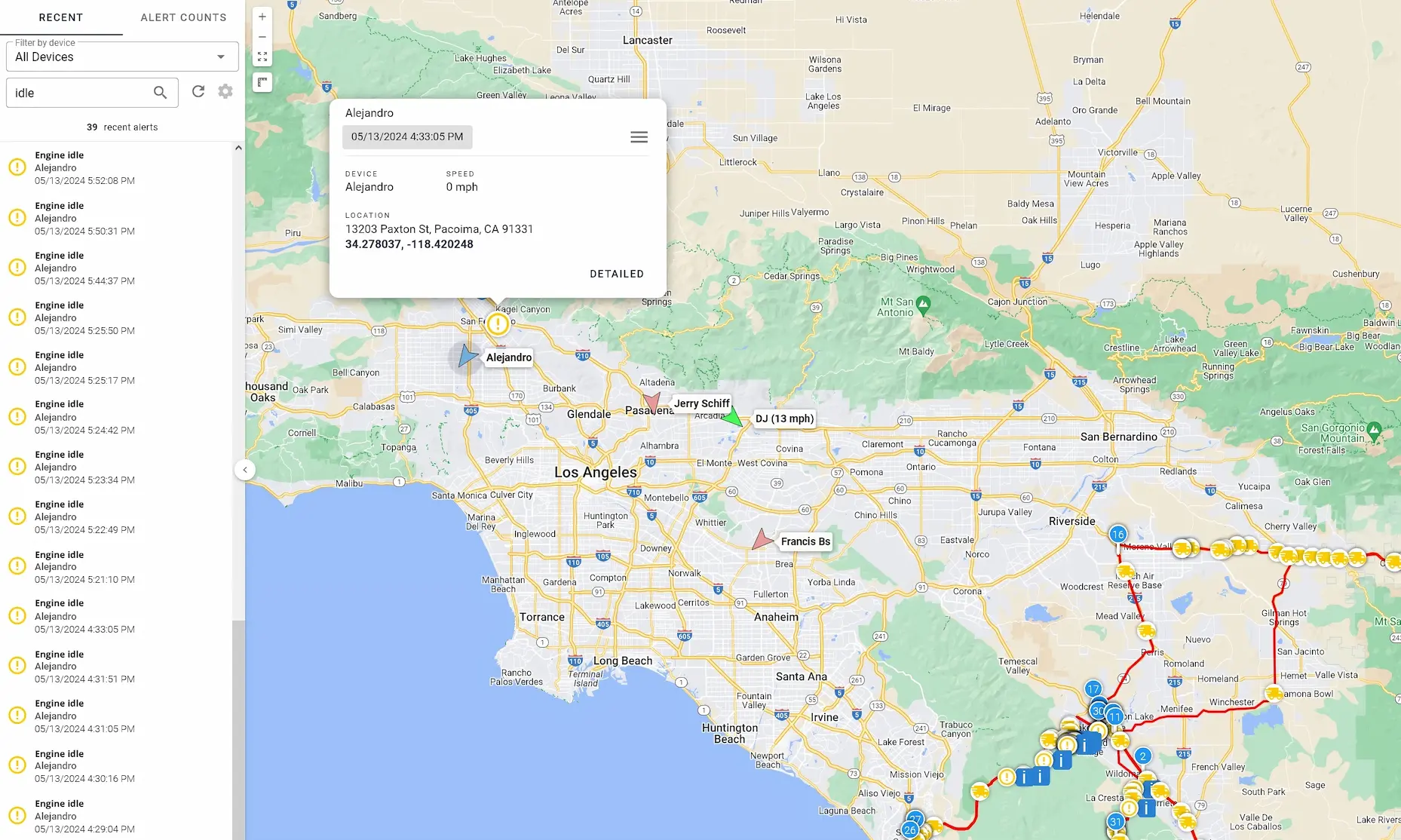
| Idle time monitoring | Surfaces hidden fuel cost and misuse at job sites | More relevant in construction than route analysis for most fleets |
| Driver behavior monitoring | Liability management and behavior change through consistent feedback | Confirm group filtering by vehicle type; on-road and off-road contexts need separate treatment |
| Driver ID | Identifies who operated a vehicle at a given time across shared and multi-driver vehicles | Useful for incident reconstruction, liability, and payroll accuracy |
| Dashcams | Incident documentation and driver exoneration for road vehicles | Driver acceptance, footage retention period, and configurability are key variables |
| Alert configuration | Reduces noise; keeps high-signal alerts actionable | Granularity of tuning matters more than volume of alert types available |
| Geofencing | Job site arrival/departure logging, after-hours intrusion alerts | Ease of creation and modification matters when job sites change regularly |
| ELD / HOS compliance | Manages hours-of-service obligations for qualifying vehicles | Not all vehicles in a construction fleet require ELD; avoid paying for it across the board |
GPS Tracking for Construction Equipment and Non-Powered Assets
This is the most construction-specific requirement on the list, and one that is commonly underserved by systems built primarily for vehicle fleets. If your operation includes trailers, heavy equipment, generators, or other non-powered assets, you need hardware that doesn't depend on vehicle power — and that hardware works differently from vehicle-mounted devices.
Worth noting specifically: high-value attachments — excavator buckets, specialized tooling, interchangeable equipment components — are frequently tracked with battery-powered devices because they move between machines and don't have a fixed power source of their own. These are often among the most expensive items on a job site and among the least likely to have any tracking at all without a deliberate effort.
Device options for non-powered assets — battery-powered, solar-powered, and hybrid wired/battery devices — are covered in the hardware section below.
Key questions when evaluating providers:
- What device types are available for non-powered equipment?
- How quickly does the system detect and report unexpected movement on a normally stationary asset?
- How does location history and reporting work for asset trackers versus vehicle trackers?
Theft Recovery Capability
The features that support theft recovery are specific: near-real-time location updates, breadcrumb trail history showing recent movement, and alert capability when a vehicle or asset moves outside expected parameters.
For vehicle tracking, update frequency matters for active theft response — a location that's 20 minutes stale is less useful when directing law enforcement to a moving vehicle. For asset trackers, normal reporting intervals typically range from once per hour to once per day depending on device configuration and battery management settings. Some asset trackers support a theft mode — a manually triggered setting that activates near-real-time location updates when theft is suspected, replacing the normal low-frequency interval with continuous reporting until deactivated.
Tamper and unplug detection matters specifically for OBD plug-in devices. If a device is unplugged, a system without tamper detection goes silent without notification — you lose visibility without knowing why. Having a backup battery inside the unit is also key, this way if power is disconnected from the equipment or vehicle and loaded into a trailer, you still want location updates. Plugin units general hold a couple hours of charge. Hardwired units hold 10+ hours of charge. Since Hardwired devices can be hiden discretely, it's much harder to find and remove them and require someone with electrical knowledge to install them.
Maintenance Tracking, Diagnostics, and Cost Reporting
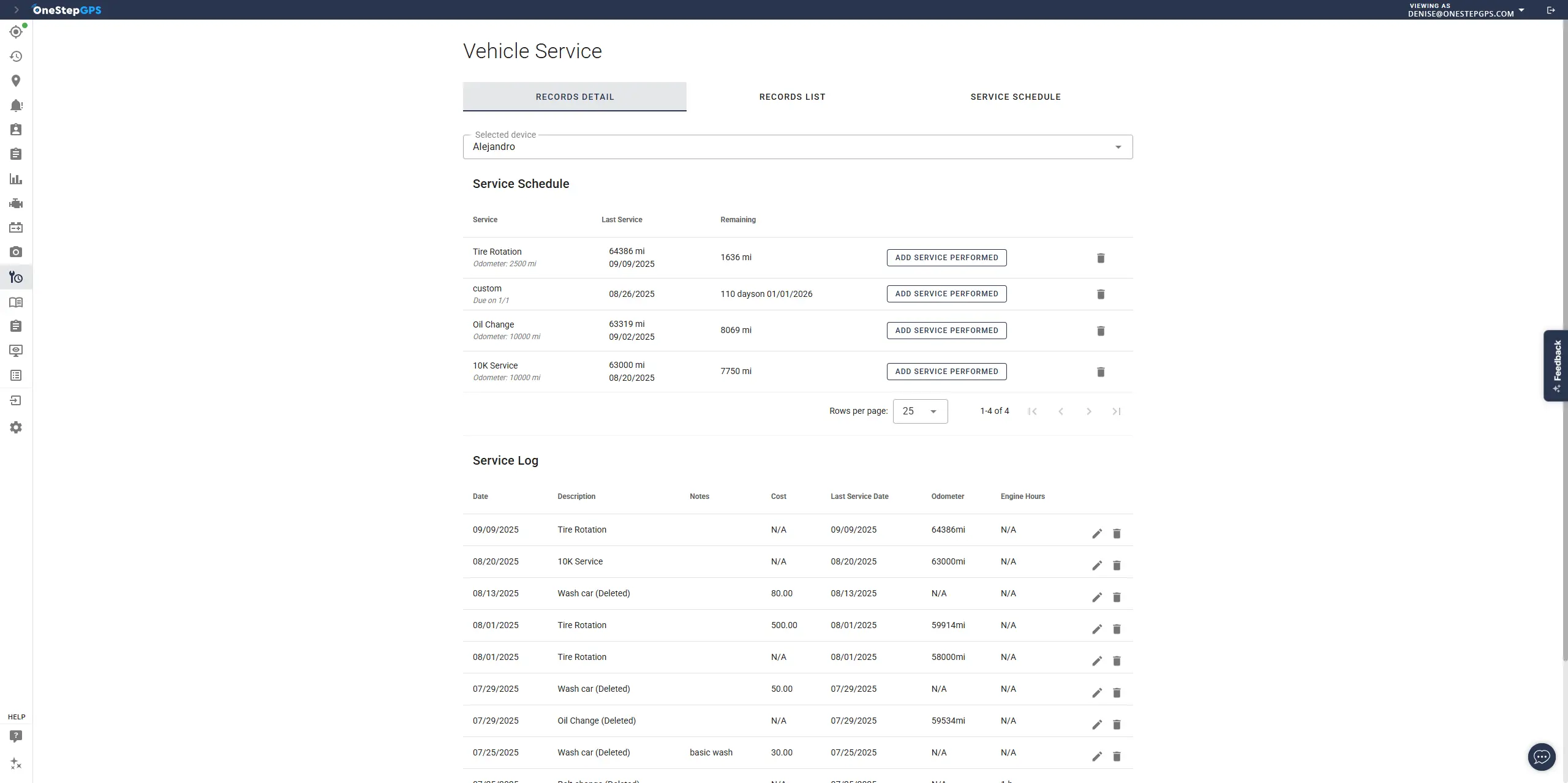
- Maintenance reminders by mileage, engine hours, or time interval catch service windows before they're missed
- Trouble code (DTC) visibility — when a check engine light appears on a shared dump truck, the GPS platform records the fault code, the time it occurred, and the vehicle's location automatically, without waiting for a driver to report it. In a shift-based crew environment, that report may never come until the problem has worsened
- Maintenance logs and cost reporting provide a running record of service history, parts, and labor by vehicle — useful for utilization analysis, resale documentation, and identifying vehicles with disproportionate maintenance burden
Idle Time Monitoring
Driver Behavior Monitoring
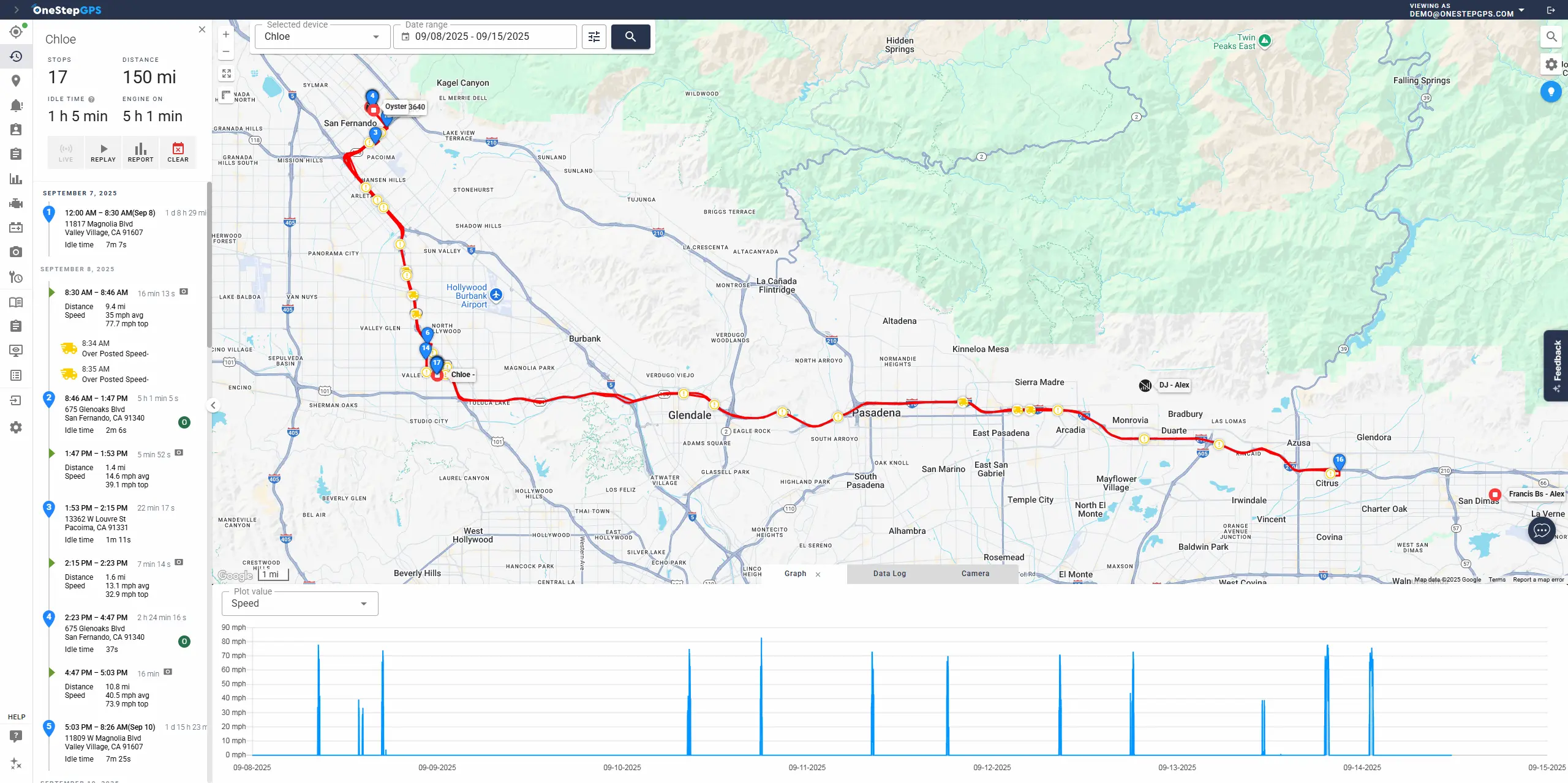
Speeding and harsh driving alerts function differently in construction than in service fleets. Crews driving to and from job sites often cover rural roads and variable terrain rather than fixed urban routes. Feedback that surfaces consistent speeding or harsh braking patterns are useful for liability management.
Construction fleets operating mixed vehicle types benefit from the ability to separate on-road and off-road vehicles in how monitoring is applied:
- Grouped scorecards by vehicle type — on-road trucks and vans scored separately from equipment operators
- Customizable alert thresholds by group — speed limits and braking sensitivity that make sense on a highway don't apply to a site vehicle moving materials across a yard
- Reports filterable by group — so analysis reflects meaningful comparisons rather than mixing incompatible operating contexts
Driver ID
In construction, vehicles are frequently shared — the same truck may be driven by three different crew members across a week. Driver ID devices — typically a key fob or card that a driver presents before starting the vehicle — let the system associate trips and events with a specific operator rather than just a vehicle.
This matters in several practical situations:
- Incident reconstruction — knowing who was driving at the time of an event, not just which vehicle was involved
- Liability — attaching driver behavior data to a named operator rather than a shared asset
- Payroll and time verification — confirming who was on the road and when
Dashcams
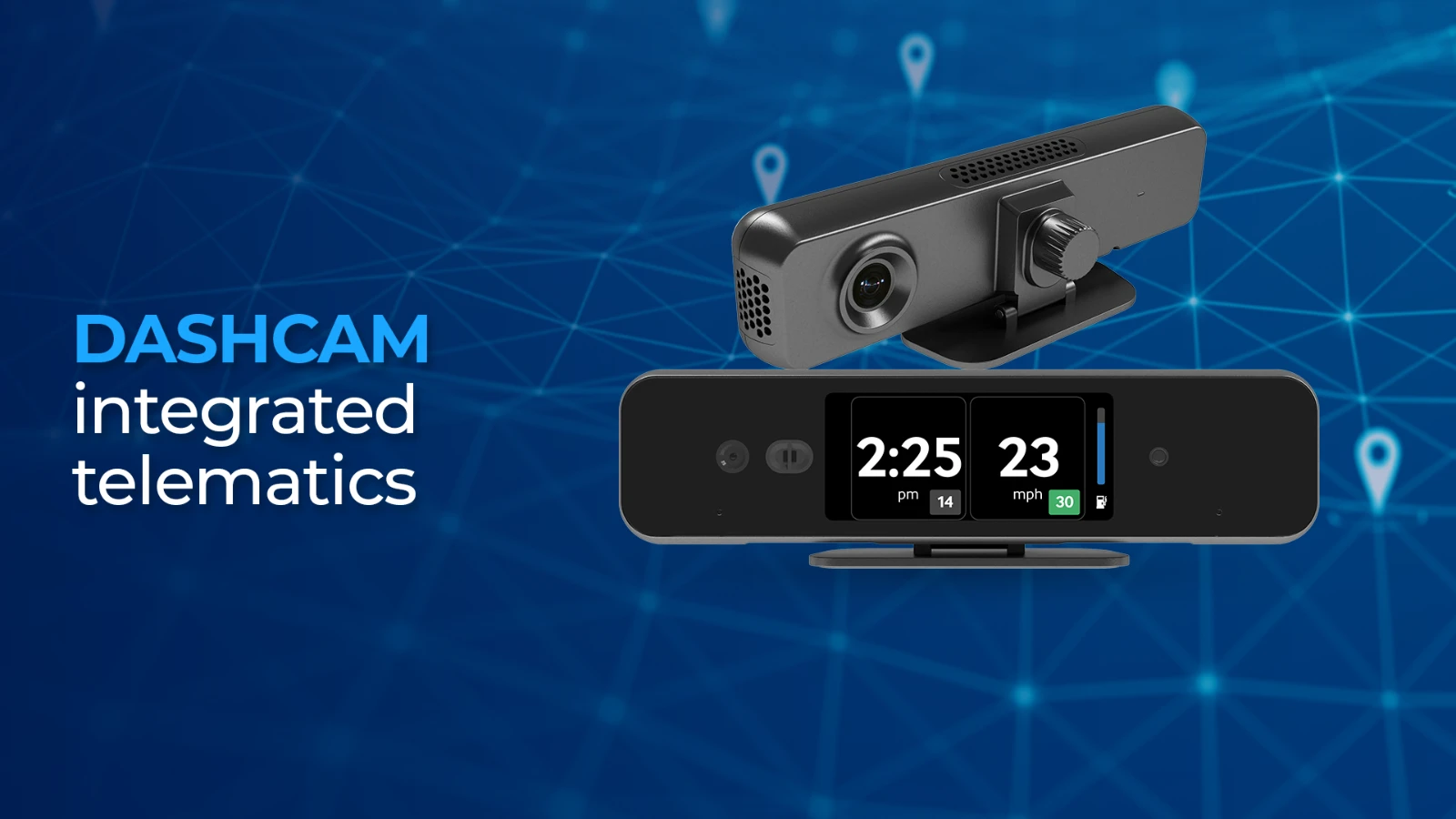
Camera adoption in construction tends to follow an incident. After an accident, a false liability claim, or a property damage dispute, the value of footage becomes concrete quickly. For construction fleets with vehicles sharing public roads — particularly pickup trucks and work vehicles in mixed traffic — dashcam footage provides documentation that GPS data alone can't.
Driver acceptance is a real variable, particularly with field crews who may be more skeptical of in-cab recording than office-managed drivers. Acceptance tends to improve when the framing shifts from monitoring to protection — footage has exonerated drivers from false accident claims and incorrect citations. When drivers internalize that the camera protects them as much as the company, resistance typically decreases.
A collaborative framing helps too. Fleets that use driver scorecards as a shared goal — where the fleet's collective safety score improves over time and individual coaching is constructive rather than punitive — tend to see better adoption than fleets that deploy cameras as a surveillance tool.
Construction-specific considerations:
- Footage retention — incidents in construction can surface months after the fact; confirm how long event footage is retained before being overwritten
- AI event detection — real-time in-cab alerts for phone use, tailgating, and distracted driving add an active coaching layer on top of passive recording
- Configurability — the ability to run forward-facing only, disable in-cab audio, or adjust recording parameters gives fleet managers options for matching the setup to their crew culture
Alert Configuration
Alert fatigue is a real adoption problem. A system configured to alert on every minor event generates noise that managers start ignoring — and then the alerts that actually matter get missed too. Construction fleet managers are typically managing multiple active priorities; a GPS system that becomes another source of constant notification may get deprioritized quickly.
The difference between a useful alert setup and an ignored one is usually configuration specificity. A speeding alert set to trigger on any speed over the posted limit, across all vehicles, at all hours, will fire constantly in a mixed construction fleet. The same alert configured to trigger at 10mph over the limit, on on-road vehicles only, during work hours, produces a signal worth acting on. Per-vehicle thresholds, per-asset alert rules, and the ability to adjust sensitivity over time separate systems that get used from systems that get ignored.
A useful question when evaluating alert capability isn't only what alerts the system can generate, but also how granularly they can be tuned.
Starting with a Pilot Before Full Deployment
Construction fleet managers who are skeptical about committing to a full rollout before seeing results often start with a subset of the fleet. Good pilot candidates are assets where visibility gaps are already costing time — the equipment that generates the most check-in calls, the job site with the most coordination friction, or the asset class with the highest theft exposure in the operation.
A phased approach gives the operator time to tune alerts, configure geofences, and build reporting habits before the system is managing 80 vehicles simultaneously. The configuration decisions that feel abstract at the start become obvious after two weeks of live data.
See how Northstar Construction addressed their biggest fleet pain points with a phased approach: Northstar Construction customer story.
Hardware for Construction Fleets
Construction fleet management software is only as useful as the hardware deployed across the fleet. Most construction operations end up with a mix of device types, and the decisions about which hardware goes where have consequences that aren't always obvious at the start.| Device Type | Best Application in Construction | Key Tradeoffs |
|---|---|---|
| OBD-II plug-in | Light vehicles — pickups, vans, SUVs; equipment with adapter-compatible ports | Fast self-install; tamper-vulnerable; adapter cables extend compatibility |
| Hardwired | Heavy vehicles, equipment without OBD ports, tamper-sensitive applications | Tamper-resistant; professional installation required |
| Ruggedized/weatherproof | Equipment with high vibration, dust, moisture, or temperature exposure | Built for demanding environments; professional installation recommended |
| Battery-powered asset trackers | Trailers, generators, compressors, equipment attachments, non-powered assets | Most common asset tracker in construction; update frequency affects battery life |
| Solar-powered asset trackers | Outdoor equipment with consistent daylight exposure | Less reliable for covered or indoor storage |
| Hybrid wired/battery | Trailers and equipment that connect to powered vehicles via standard wiring harness | Full-frequency when connected to power; drops to battery interval when unpowered |
| OEM integration | Newer fleet vehicles or equipment with factory telematics already active | No aftermarket hardware needed; dependent on OEM data availability and platform support |
OBD-II Plug-In Devices
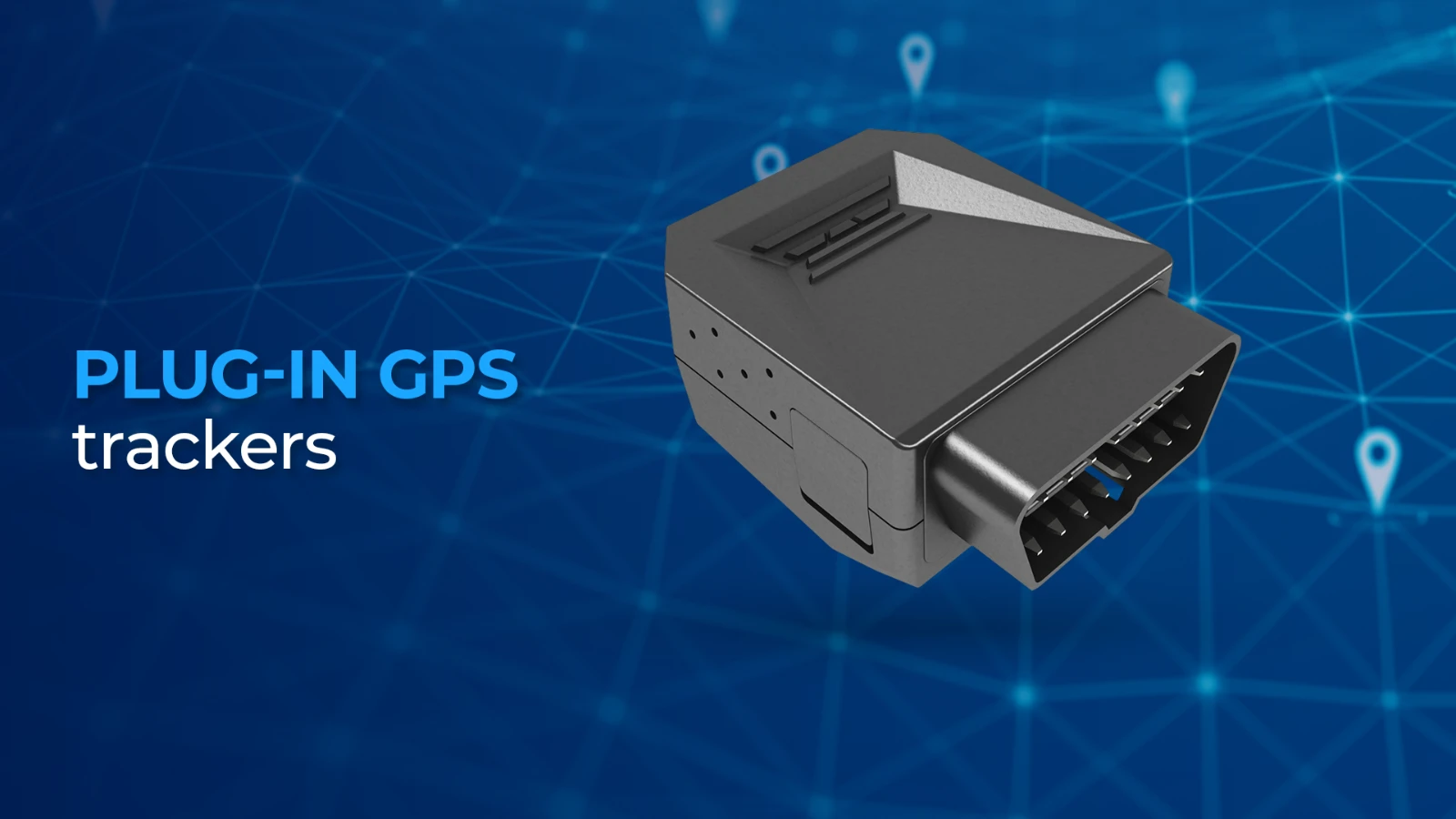
OBD-II plug-in devices install in under a minute without tools and provide full vehicle tracking and diagnostic capability on vehicles with an accessible port. They're well suited for light vehicles — pickups, vans, SUVs — where speed of deployment matters.
Adapter cables extend OBD-II compatibility beyond standard light vehicles, allowing plug-in devices to connect to equipment and ports that don't use a standard OBD-II configuration. For construction fleets with mixed vehicle and equipment types, this expands the range of assets that can use plug-in hardware without requiring hardwired installation.
Tradeoffs to know:
- Can be unplugged deliberately or accidentally; tamper alerts notify when power is lost unexpectedly but don't prevent removal
- Y-cable adapters allow the device to be routed behind the dash, keeping the OBD port accessible while hiding the tracker and decreasing the change of tampering
Hardwired Devices
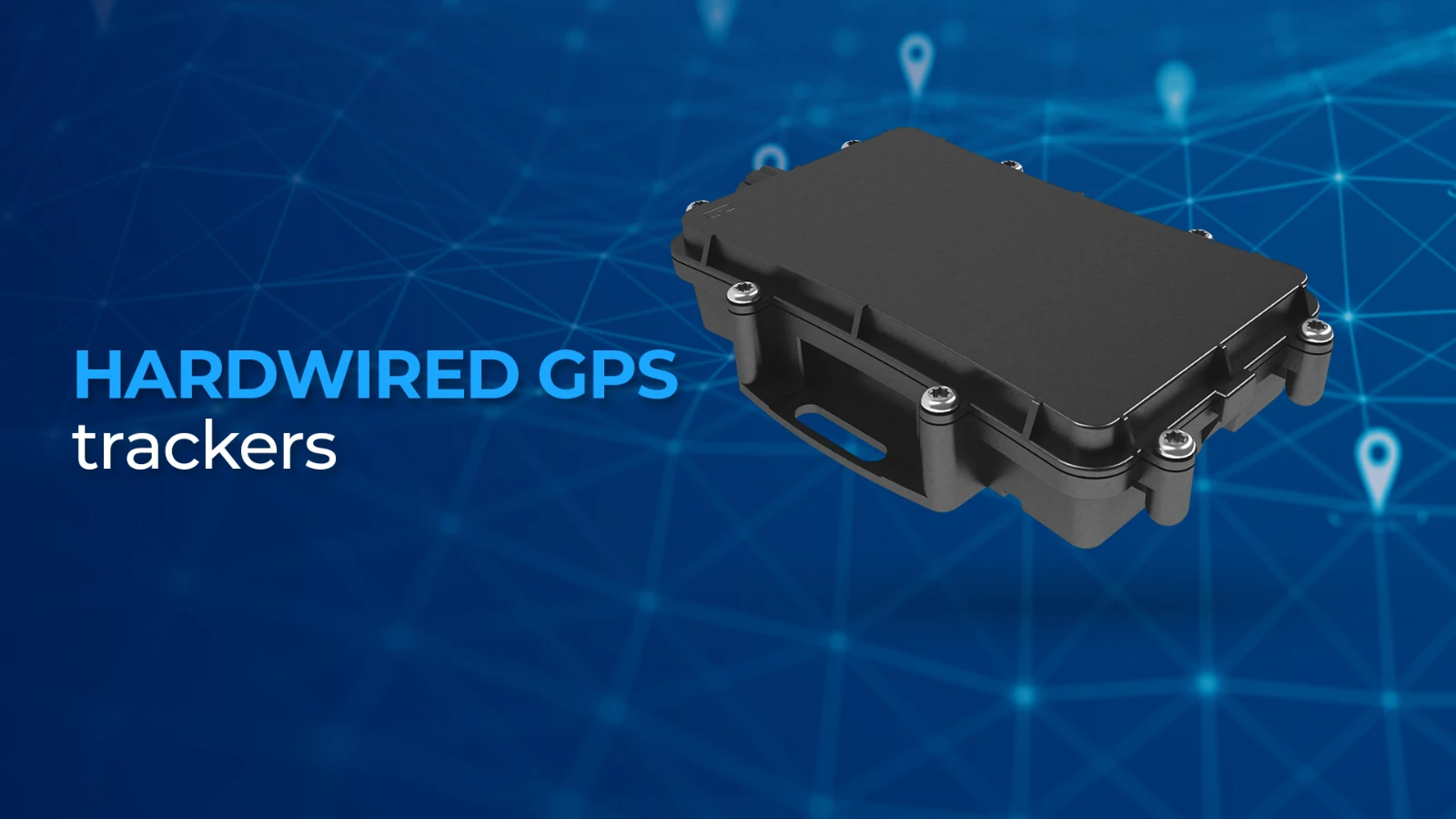
Hardwired installation removes the tamper vulnerability of plug-in devices and is generally indicated for heavy vehicles, equipment without easily accessible OBD ports, and applications where tamper resistance outweighs installation speed.
Hardwired installation requires an installer familiar with electric wiring and takes longer than plug-in deployment — a planning consideration when rolling out across a large fleet.
Ruggedized Devices
Standard GPS hardware isn't designed for the conditions construction equipment operates in:- Persistent vibration from heavy machinery
- Dust and debris exposure
- Temperature extremes
- Moisture from outdoor storage and wash-down
Battery-Powered Asset Trackers
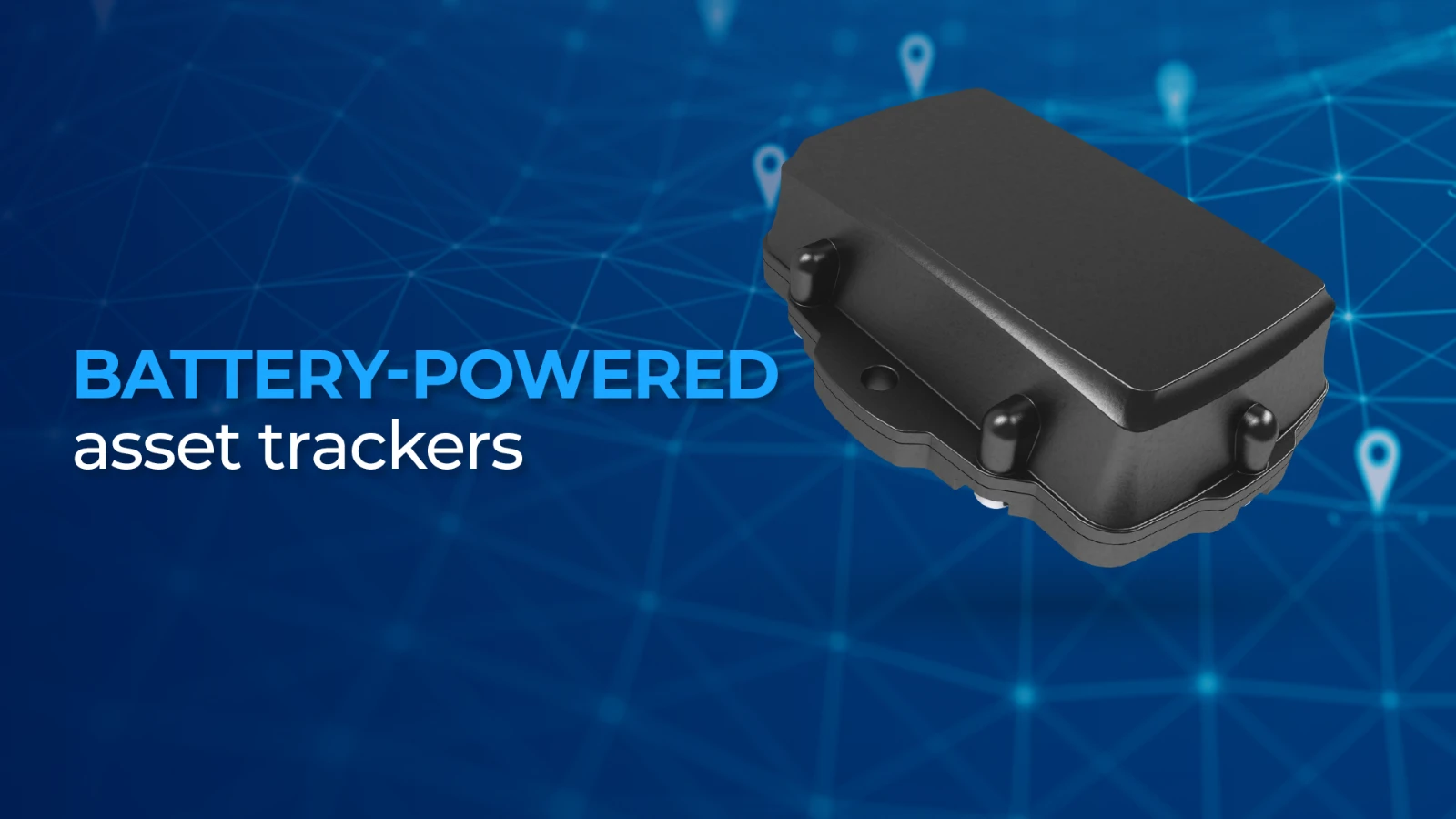
Battery-powered trackers are the most common non-powered asset tracking choice in construction. They attach via magnets, screws, or adhesive and require no external power source — making them practical for trailers, generators, compressors, and high-value equipment attachments that move between machines.
Update frequency directly affects battery life. A tracker configured to report every few minutes drains significantly faster than one reporting hourly. Match the update interval to how the asset actually behaves: a trailer that sits at a job site for two weeks doesn't need the same frequency as a generator that moves between sites regularly.
If theft is a concern, some of these units offer a theft mode that increases reporting intervals when activated.
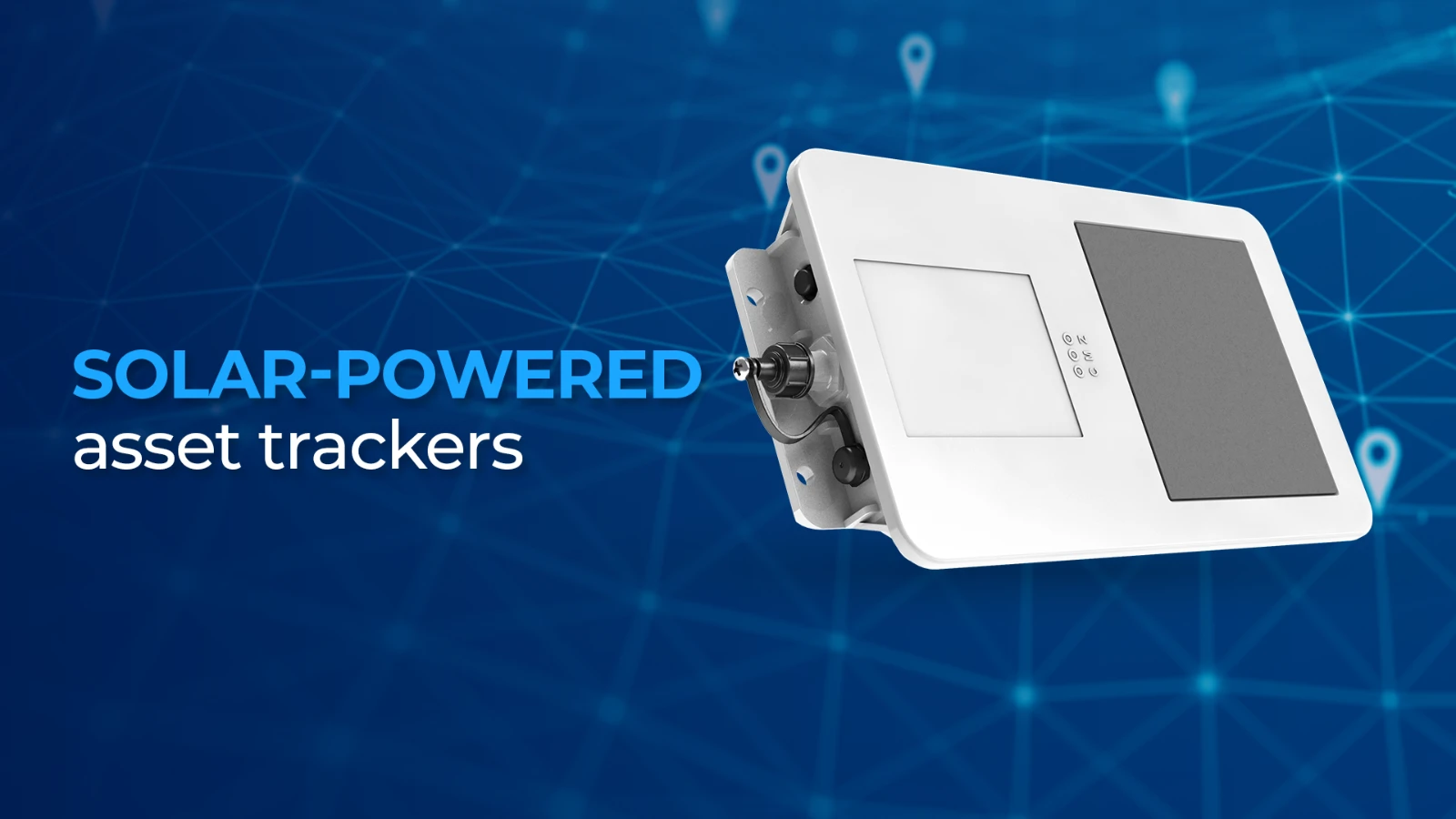
Solar-Powered Asset Trackers
Hybrid Wired/Battery Devices
Hybrid devices — trackers that connect to a trailer or equipment wiring harness and draw power from the tow vehicle when connected, falling back to battery-powered transmission when the connection is broken — offer a practical middle ground for trailers that move frequently when attached but sit for extended periods between jobs.
The standard 7-pin trailer connector common on most towed construction equipment is the typical connection point. When powered, these devices transmit at the same frequency as a standard vehicle tracker. When disconnected and sitting unpowered, they drop to a reduced battery interval — preserving battery life while maintaining location awareness.
OEM Telematics Integrations
Newer construction vehicles and equipment increasingly come with factory telematics already active — John Deere's JDLink, Stellantis connectivity, VisionLink for Cat equipment, and others. For fleets with a significant portion of newer or OEM-connected assets, a fleet management platform that integrates with those data sources can reduce or eliminate the need for aftermarket hardware on those specific vehicles.This is worth evaluating if your fleet is predominantly newer equipment or if you already have OEM telematics active and are looking for a single management layer across both OEM and non-OEM assets. OEM integration capability varies significantly by platform. For a fuller treatment of hardware architecture decisions, see: Fleet GPS Hardware Deployment Models Explained.
Note: Remote starter disable (kill switch) hardware is an add-on that could be considered for construction fleets where active vehicle immobilization capability is needed beyond tracking and alerting.Reports That Matter for Construction Fleet Management
Construction fleet management software typically generates reports across various operational categories — covering everything from asset utilization and job site activity to driver behavior and compliance. The table below covers the reports construction fleet managers use most, what each shows you, and a concrete scenario for when it gets pulled up.| Report Type | What It Shows You | Example of When It's Useful |
|---|---|---|
| Vehicle & asset utilization | Which vehicles and assets are active, idle, or unused over a period | When auditing vehicle utilization and right-sizing by job or entire fleet |
| Time at location | How long vehicles or crews spent at specific job sites or geofenced areas | When a subcontractor disputes hours on site, or a billing cycle needs job site documentation |
| After-hours movement | Vehicle and asset activity outside defined work hours | When a piece of equipment goes missing overnight, or unauthorized vehicle use is suspected |
| Idle time | Engine-on time with no movement, by vehicle and location | When fuel costs are higher than expected and the cause isn't obvious from mileage alone |
| Driver behavior | Speeding, harsh braking, aggressive starts by driver and vehicle group | Coaching sessions, insurance audits, post-incident liability review |
| Maintenance & service history | Service records, fault codes, cost by vehicle | When selling a vehicle, budgeting for the next quarter, or identifying a chronic problem asset |
| Mileage | Total distance by vehicle over any period | Reimbursement processing, fuel card reconciliation, billing clients for mobilization |
| IFTA mileage | Miles traveled by state, for qualifying vehicles | Quarterly fuel tax filing for vehicles operating across state lines |
| Trip history & audit trail | Full record of stops, routes, and events by vehicle | Reconstructing the timeline around an incident or responding to a liability claim |
| Geofence activity | Arrivals, departures, and dwell time by location | Job site documentation, subcontractor accountability, arrival or departure from key locations |
Utilization Data and Fleet Rightsizing
A fleet running 40 vehicles across three active job sites rarely has those vehicles distributed the way the schedule assumed.
Utilization reports surface which vehicles are active, which are sitting idle at a site, and which haven't moved in days.
A superintendent pulling a weekly utilization report might find that two dump trucks assigned to Site B have been inactive for eight days while Site A is waiting on hauling capacity. Without data, that's a problem nobody knows exists until someone makes a phone call. With tracking, it's simply visible.
The same data answers longer-range questions: which vehicles are consistently underutilized across projects, which are consistently overworked, and whether the fleet's composition matches the work it's actually doing.
IFTA Reporting
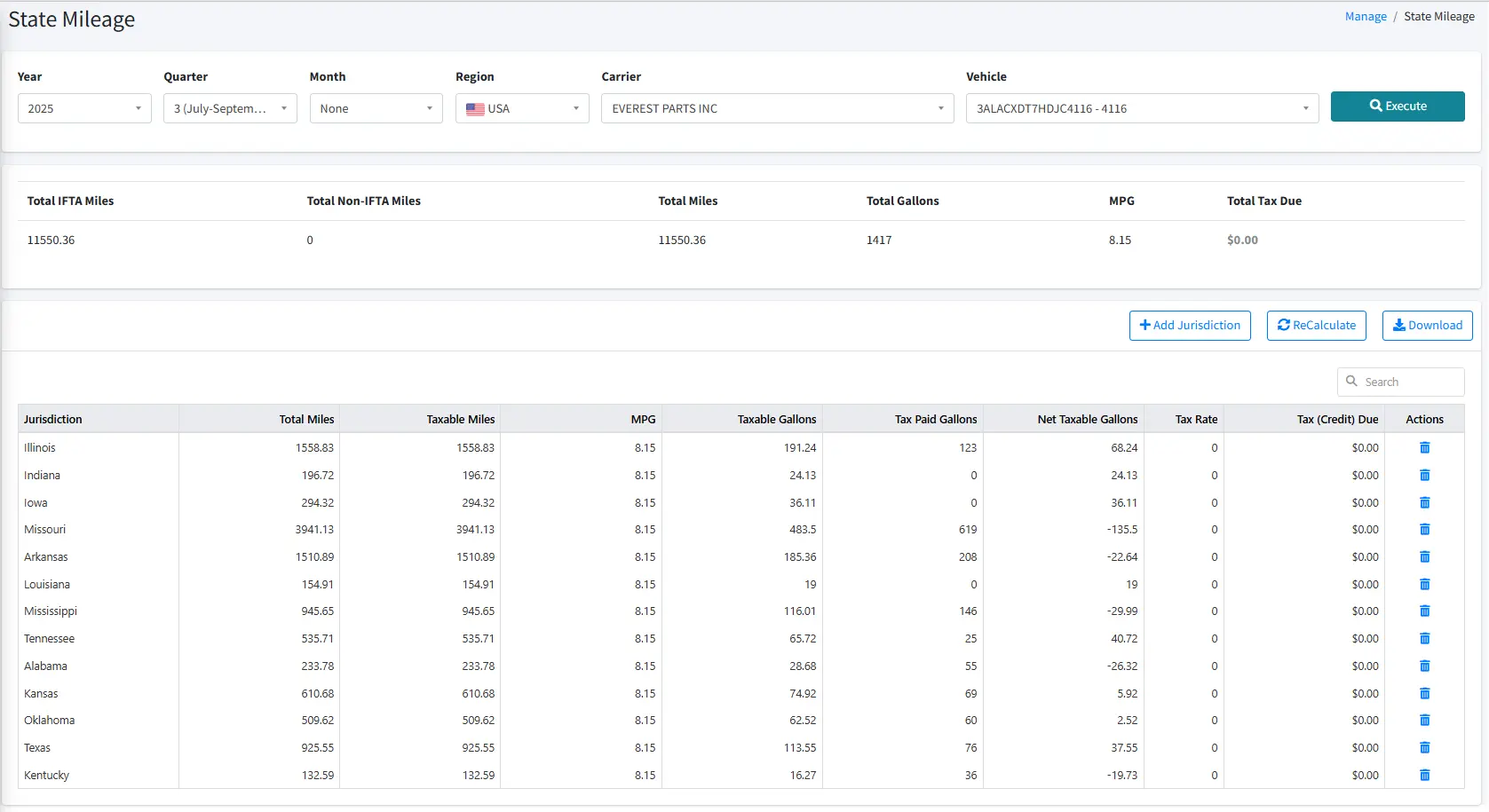
For construction fleets with vehicles that cross state lines — hauling materials, moving equipment between projects in different states — IFTA (International Fuel Tax Agreement) fuel tax reporting is a quarterly compliance obligation.
Without GPS, it typically requires drivers to maintain manual mileage logs by state, which are then reconciled against fuel receipts. GPS systems that generate IFTA-formatted mileage-by-state reports replace that manual process with data that's already being captured. Not all GPS platforms generate IFTA-formatted reports; confirm this capability if interstate operation is part of your fleet's regular pattern.
Data Retention and Provider Switching
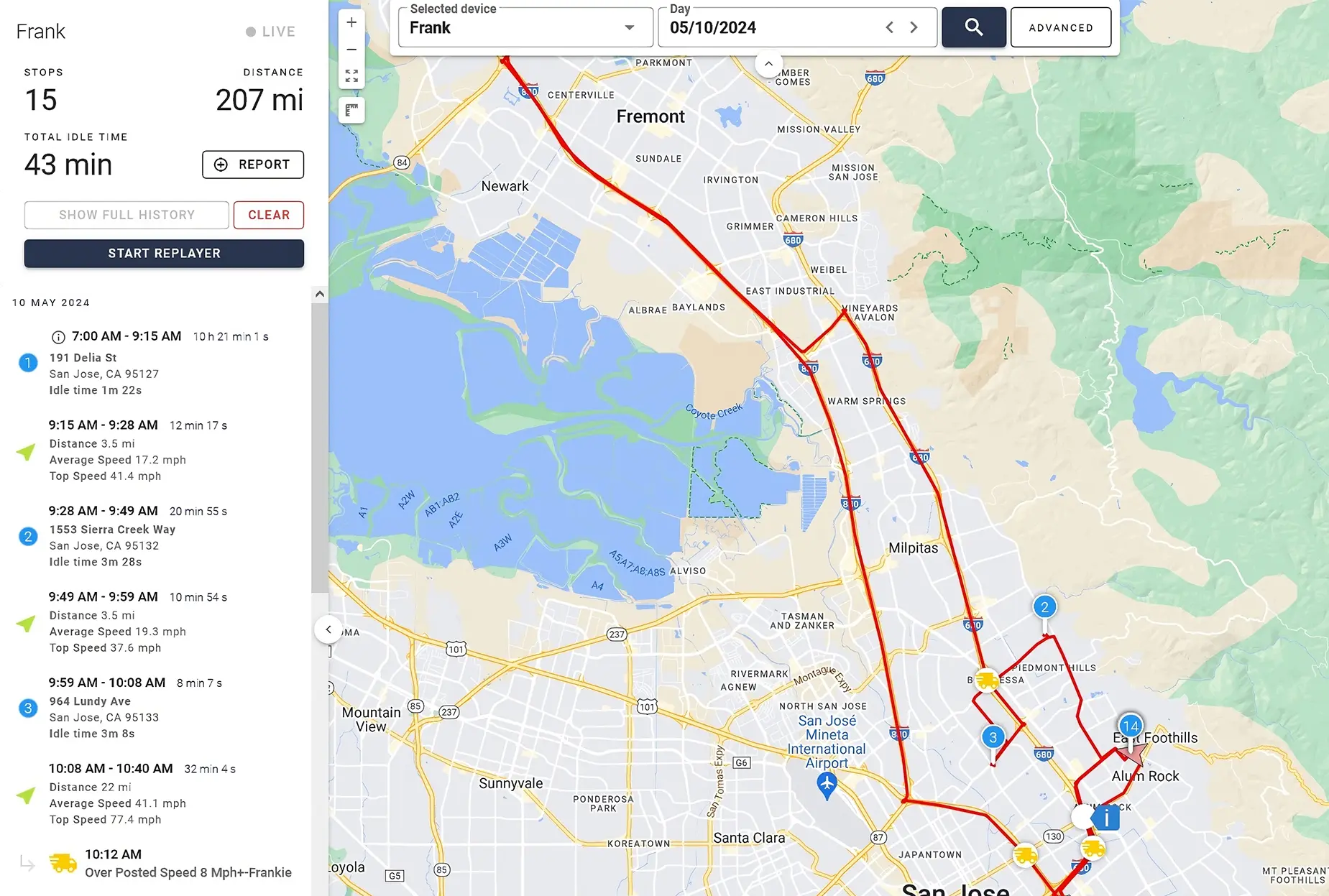
Three years of data retention covers most dispute and claim timelines in construction. Vehicle incidents, property damage claims, and workers' comp cases can surface long after the original event — having a retrievable record of where a vehicle was, when it stopped, and what speed it was traveling matters when a claim arrives 14 months later.
One question worth asking before committing to any provider: what happens to your historical data if you switch? Before signing, ask directly: "Can I export my full trip history, maintenance records, and event footage in a standard format at any point during or after my contract?" Some providers make data export straightforward; others don't. Clarifying this before signing is simpler than trying to recover records after a contract ends.
Contract and Commercial Structure
If you're mid-contract and evaluating alternatives, the structure of your current agreement — specifically its early termination fee calculation and auto-renewal window — determines your options more than any feature comparison does.Most fleet GPS providers use multi-year contracts as their standard model. Three-year terms are common, based on our dataset across major providers. The problem for construction fleets isn't the contract itself — it's what happens when the fleet changes during the term. Contract rigidity shows up in several specific ways:
- Devices that can't be removed without paying out the remaining term
- Auto-renewal clauses that extend the agreement automatically if written cancellation isn't provided 30 to 90 days before the end date — a window that varies significantly by provider and is often missed by operators focused on project delivery rather than vendor administration
- Rate structures that don't adjust when vehicle count drops mid-project
For a construction company that scales up for a large project and back down when it wraps, paying subscriptions on inactive vehicles is a predictable cost that should be part of the evaluation — not a surprise that surfaces mid-contract.
Before signing any fleet GPS agreement, get answers to these questions in writing:
- What happens when a vehicle is sold mid-contract — can that device be removed without penalty?
- Is there an early termination fee, and how is it calculated?
- Does the contract auto-renew, and what is the cancellation notice window?
- Can devices be deactivated during seasonal slowdowns, and is there a reactivation fee?
- Can fleet size be reduced mid-term, or does the contracted device count stay fixed?
For a detailed breakdown of how early termination fees are structured and calculated across major providers, see: Early Termination Fees in Fleet GPS Contracts.
A Note on Integrations
A construction fleet may run several tools in parallel — fuel cards, maintenance systems, dispatch software, and more.
Fleet management systems often have built-in integrations with tools like these. If one or more of them is a dedicated part of your operations, it's worth checking what integrations are available with a GPS provider you're evaluating.
Fuel cards — integrations with fuel card providers (WEX, Fuelman, Coast, and others) connect GPS mileage and idle data with fuel transaction records, making it easier to identify discrepancies and manage fuel cost across the fleet without manual reconciliation.
Field service and job management tools — for construction-adjacent operations (electrical, HVAC, plumbing, and similar trades), integrations with platforms like ServiceTitan, Jobber, and HouseCall Pro connect dispatch and scheduling workflows with vehicle location data.
Maintenance platforms — integrations with fleet maintenance systems (Fleetio, MaintainX, UpKeep) allow GPS-triggered maintenance alerts to flow directly into work order and service scheduling workflows rather than sitting in a separate system.
Open API — for fleets with custom workflows or internal systems, an open API with documentation allows GPS data to be connected to tools the platform doesn't natively integrate with. Developer assistance availability and cost varies by provider.
Where to Go From Here
If you're mid-contract with a current provider and evaluating alternatives, the first useful step is understanding your renewal window and early termination fee terms before doing anything else.
Your auto-renewal window is typically defined in your master service agreement or order form — look for language around "cancellation notice" or "renewal terms." Many construction fleet managers find their notice window is earlier than expected — sometimes 60 or 90 days before contract end — and start the process later than they should have. Make sure you check your contract for the specific window that applies.If you're approaching renewal or evaluating, the feature framework above serves as a working checklist for conversations with providers. Ask specifically about asset tracking hardware for non-powered equipment, DTC support on your vehicle types, how idle and geofence reporting works, and how the contract handles fleet size changes during the term. Starting with a pilot on a subset of the fleet — problem vehicles, high-theft assets, or a single active job site — is a practical way to validate fit before committing to a full deployment.
If you're actively comparing providers, the Fleet Management Provider Comparison covers 13 providers across 110+ data points including contract structure, hardware options, and feature availability.
Author

Nico Photos
Customer Insights Manager
Table of Contents
Start using One Step GPS
Enterprise-grade fleet tracking, $13.95/mo, no contracts
100-day money back guarantee
Lifetime warranty
1-30 second updating
4G LTE Equipment



★★★★ ★ ★
4.9 / 5 Serving over 20,000 fleets
20,000+ of the world's fleets are monitored with One Step GPS




























Author
Nico Photos
Customer Insights Manager
Nico is obsessed with how One Step GPS customers use and derive value from our platform and devices. He regularly conducts interviews with fleets of all shapes and sizes to document the problems they're facing, their needs, and the tools and solutions that help make their lives easier.