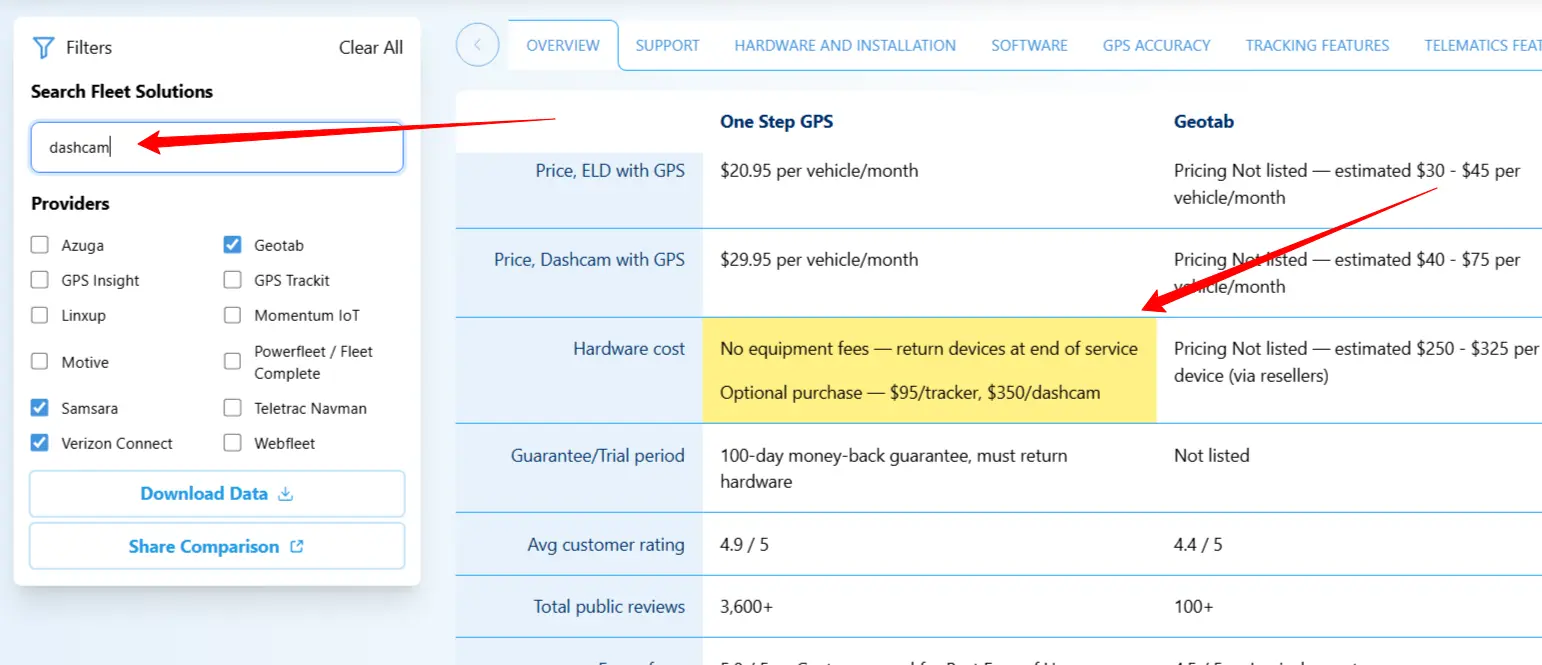
Use the left control panel to select the providers you want to compare and set filters for price and customer rating:
Your choices here directly influence the data that appears in your table.
Across the top of the tool, you’ll see that the data is divided into 15 different categories:
Click on each to find detailed information about the topic.
The table scrolls up and down for additional data points and left-to-right if all the providers you selected don’t fit on a single screen. Make sure you scroll enough to see all the data you output.
Use the search bar to highlight matching data and rapidly locate what you're looking for.
The cells with the closest match to your search keyword will appear dark yellow, in lower-confidence matches the yellow is faded.
Fleet management software pricing is often difficult to compare because most providers bundle hardware, software, and services differently. Many platforms offset device costs through longer contracts, tiered feature access, or bundled subscriptions rather than publishing standardized monthly rates.
In addition, pricing frequently varies based on fleet size, contract length, region, and selected modules such as ELD compliance or video telematics. As a result, publicly advertised prices may not reflect the full cost of ownership, and comparable features may appear at different price points across providers.
This comparison focuses on identifying structural differences in pricing, contracts, and feature access using publicly available information and third-party sources, rather than attempting to represent negotiated or enterprise-specific pricing.
Pricing estimates are based on 1) publicly listed prices from the provider’s materials, and, where unavailable 2) reputable third-party sources, and 3) verified reviews and statements, in that order of importance.
Reviews data were calculated using weighted averages from each provider’s top three sources of third-party reviews based on the number of reviews that source lists. Commonly used sources were Capterra, G2, Source Forge, among others.
Features were taken from the provider’s own material, and from reputable third-party sources otherwise where unavailable.
Wherever available we drew pricing and contract lengths directly from the provider themselves, however it is important to note that transparent data on price and contracts is not standard in the industry.
In most cases, these were not available directly from the provider or needed further clarification.
Because of this most pricing data are estimates based on verifiable third-party statements
Most providers on this list work on a quote-based model. Every potential customer is given an individual quote based on factors that only the provider themselves can know completely.
Different providers may use different methods for arriving at a final price. Based on customer reviews and limited provider-published information, some factors that may influence the real price of a quote could include:
Inclusion on this list was based on an internal assessment of the most widely used fleet management and telematics providers on the North American market.
Inclusion on this list in no way represents affiliation with or recommendation by One Step GPS.
No paid placements or other forms of sponsorship were, or will ever be, allowed on this list.
Overview tab
Summary: a general overview of each provider, compiled primarily from that provider’s own materials and supplemented by how people in general perceive the provider based on analyst reports, verified reviews, content and editorial coverage, etc.
Website: A direct link to the provider’s website.
Price, GPS: The monthly price or estimated price of that provider’s GPS subscription for a single vehicle. This figure is intended to reflect only software subscription costs, not hardware costs. Interpret this as a “per device, per month” figure. E.g. One Step GPS charges $13.95 per month per GPS device. For almost all providers this number is an estimate based on available third-part data. Providers should be contacted directly for definite pricing information.
Price, Dashcam with GPS: This is the monthly price or estimated price of that provider’s GPS plus Dashcam subscription per vehicle. This figure is intended to reflect only software subscription costs, not hardware costs. For almost all providers this number is an estimate based on available third-party data. Providers should be contacted directly for definite pricing information.
Hardware cost: This is an estimated cost of a single piece of hardware from each provider. Verifiable data on this is very limited, this column should be treated as a general estimate only, with low confidence. Many providers bundle the cost of hardware into monthly payments, so this figure is not always easily separable from monthly software subscription costs.
Guarantee/Trial period: Any trial period offered by the provider or time under guarantee of return, or penalty-free cancellation of service. The most common model is an “x-day trial period” where service can be cancelled and devices returned to the provider without penalty.
Avg customer rating: This is the weighted average of verified customer reviews across the provider’s three largest sources of third-party reviews. For example, One Step GPS has the most reviews on Shopper Approved, Capterra, and G2. We calculated the weighted average of all those reviews for the figure in our chart. The top three reviews sites are different for each provider.
Total public reviews: The sum of all the reviews across the three largest third-party reviews listings for each provider. It is simply the sum of all reviews from the three sources used to calculate Avg customer rating, this gives an idea of how many total reviews the average is based on.
Ease of use: A compound metric based on the number of reviews that mentioned a provider’s platform was easy or difficult to use, supplemented by any awards and statements from industry analysts to support this.
Contract term: An estimated length of the average contract that provider offers. This is generally not published information and is estimated from third-party sources.
Contract early cancellation fee: Some providers list this information in their terms of service or other publicly available legal documents. In some cases this was inferred from third-party statements. Clarify with any provider you speak to, to understand the exact terms of their contracts.
Paywalled features: A “Paywall” refers to a feature that is not available unless you pay an additional fee. This is not generally published by the provider, so most of these statements are drawn from customer reviews. Clarify the real costs for the exact features you plan to use with any provider you talk to.
Implementation speed/Time to value: A compound metric based on the number of reviews that mentioned a provider’s platform was fast and easy to onboard and begin seeing value from, supplemented by awards or statements from industry analysts to support this.
Scalability score: A compound metric which considers: ability to add new devices and accommodate various vehicles, machinery, equipment and assets, geographical reach, Integrations count, API availability, and the ability to add users and assign permissions.
Reasons customers choose: This was a sentiment arrived at by having an LLM study the reviews of each provider and summarize the main reasons customers choose them. It was manually reviewed for general accuracy.
Reasons customers ditch: This was a sentiment arrived at by having an LLM study the reviews of each provider and summarize the main reasons customers leave them. It was manually reviewed for general accuracy.
Support tab
Customer support rating: A compound metric considering: Third-party reviews sources, which often give this as a rating, awards for customer service. To supplement, verified reviews were given to an LLM to look for trends in statements indicating support quality. Outputs were manually reviewed for general accuracy.
Onboarding/training: A short description of the onboarding support offered by each provider. This is generally published on their websites and summarized here.
Ongoing training: A short description of the ongoing training offered by each provider. This is generally published on their websites and summarized here.
Hours of availability: The listed hours their support is available.
Speed to resolution: An estimate of the average time it takes to resolve a technical or other support request. This is not published information (except One Step GPS) and should be regarded as a ballpark figure based on the overarching sentiment from available customer reviews.
Hardware and installation tab
OBDII/Plugin devices: Whether the provider offers OBD-compatible devices. These devices plug in to a vehicle’s OBD port and are generally self-installed.
Hardwired: Whether the provider offers hardwired devices. These devices are wired into the electrical system of a vehicle or machinery and are often professionally installed.
AI Dashcams: Whether the provider offers AI-enabled dashcams with a note on what AI functionality these dashcams offer.
Battery-powered asset trackers: Whether the provider offers battery-powered asset trackers.
Solar-powered asset trackers: Whether the provider offers solar-powered asset trackers.
Specialty equipment: An estimated range of the supporting secondary equipment the provider offers with brief notes on the common types, such as kill switches, cold chain monitoring, adapter cables, etc.
Hardware reliability: An estimate of the general reliability of a provider’s hardware, with notes on issues we commonly came across in third-party customer reviews.
Accuracy: GPS accuracy describes the farthest expected distance the reported location can be from the actual location of the GPS, given in feet. For example, “~6 feet” means the GPS is expected to give a location within approximately 6 feet of the actual tracker.
Refresh rate: The amount of time between location reports sent from the GPS tracker to your computer or app. A key factor to consider when assessing your tracking needs. A faster refresh rate provides more frequent updates and more reliable, near-real-time visibility of vehicle movement. In fleet tracking, “real time” is generally considered a refresh rate of 30 seconds or faster.
Connectivity: A rating of the strength of the cellular signal from your device to the cellular network it is connected to. Low connectivity = a weak cellular connection, just like having low bars on your phone.
Self install: Whether the provider offers GPS options you can install yourself.
Professional install: Whether the provider offers professional installation services.
Ease of installation: A general estimate of the ease or difficulty of installing a given provider’s GPS units, based on observed patterns in third-party statements.
Warranty: The provider-specified hardware warranty, if available, with a brief note on terms at the time of this writing. This is drawn from the provider’s data exclusively.
Coldchain/Temperature monitoring: Whether the provider offers temperature monitoring solutions for cold chain transportation.
Driver ID: Whether the provider offers a solution for driver ID. This tracks which driver was operating which vehicle, rather than just tracking the vehicle itself. Often helpful when multiple drivers operate a single vehicle or when vehicles are assigned for various jobs.
Ruggedized devices: Whether the provider has devices built to withstand harsh conditions (such as vibration, dust, moisture, extreme temperatures, or rough handling). Often needed for fleet management in construction, mining, utilities, boating, and other demanding environmental conditions.
Software tab
App availability: Specifies which operating systems the provider offers mobile apps for — iOS, Android, or both.
App rating: The weighted average of app ratings on both the Android and iOS app stores. Many providers have various apps for managers, drivers, or other purposes; this metric reflects only the ratings of the manager apps.
Ease-of-use/Learning curve: A summary of the ease to learn and use any given provider’s software and hardware, given on a scale from 0-5, with an added note for context. This was arrived at by compiling sentiments from many public reviews for each platform and looking for trends in positive and negative statements regarding ease of using the platform. We put the reviews through an LLM to facilitate this and the output was reviewed manually.
Cost to add users: A note on whether a provider charges any additional cost to add users. As this number would have been nearly impossible to accurately estimate we simply noted whether there is or is not a fee for added users.
Role-based user permissions: Whether a given platform offers the ability to assign users with different levels of permissions and the scope of customizability. Useful for fleets who use management software across different roles and responsibilities and need the ability to customize who can access what within the platform.
Data retention: The length of time the provider makes historical GPS data available to their customers. Some companies tier this service and charge additional fees for longer retention periods, this was noted where applicable. Longer retention is often important for compliance, reporting, trend analysis, or dispute resolution.
Integrations: A brief statement of the comprehensiveness of integrations offered by the company. Common integration types considered include insurance partners, fuel cards, and complementary fleet management tools.
Open API: Whether the provider offers an open application programming interface (API) that allows customers or third-party developers to access fleet data and build custom integrations, reports, or applications beyond the standard software.
App uptime: The average percentage of time a provider’s platform is live and accessible as expected. Many companies list this in their service-level agreements. This was drawn from company materials where possible and omitted when not.
GPS Accuracy tab
Refresh rate: The amount of time between location reports sent from the GPS tracker to your computer or app. A key factor to consider when assessing your tracking needs. A faster refresh rate provides more frequent updates and more reliable, near–real-time visibility of vehicle movement. In fleet tracking, “real time” is generally considered a refresh rate of 30 seconds or faster.
GPS accuracy: GPS accuracy describes the farthest expected distance the reported location can be from the actual location of the GPS, given in feet. For example, “~6 feet” means the GPS is expected to give a location within approximately 6 feet of the actual tracker.
Cellular connectivity: A rating of the strength of the cellular signal from your device to the cellular network it is connected to. Low connectivity = a weak cellular connection, just like having low bars on your phone.
Tracking Features tab
Geofences & arrival/departure alerts: A geofence is a virtual boundary drawn over your GPS map which can be used for administrative purposes like marking customer locations, various company buildings or lots, vendors, etc. Fleet management software often includes a feature that allows the user to trigger alerts when vehicles enter or exit those zones. This can be useful for tracking time on a job site, detecting after-hours vehicle use, alerting when a vehicle leaves an approved region or route, and much more.
Historic trip playback & audit trail: A feature that allows users to see the route a vehicle took throughout a specific time period, generally days or weeks. Different providers offer different experiences but generally the routes driven, time spent on route, alerts triggered on the route, stop locations, and times stopped are available. This makes reviewing routes easy.
Routing, dispatch & ETA /Customer notifications: Whether the provider offers tools built specifically for these categories:
- Routing tools help you audit and plan the most efficient routes based on your specific needs.
- Dispatch tools allow you to assign jobs and routes to specific drivers, allow you to manage them in real time, and give you visibility into the progress of them.
- ETA tools help let customers know when a driver is expected to arrive at a specific location, some automate the customer notification process
Telematics Features tab
Engine/vehicle diagnostics (fault codes, maintenance alerts): Whether the provider can detect, alert, and report Diagnostic Trouble Code (DTC) readouts as they are triggered.
Fuel / utilization data (idle time, fuel use): Whether the provider can detect, alert, and report on vehicle fuel usage and idle time.
OEM / multi-vendor data integration: Whether the provider can integrate with original equipment manufacturer (OEM) data. This allows you to simply register your vehicle on the platform and send all GPS and telematics data using the OEM built-in telematics system, making device installations unnecessary.
Custom reporting & dashboards: Whether the provider has tools for building custom reports and/or dashboards to help you manage, visualize, and report data.
Safety Features tab
Driver behavior monitoring: Whether the provider can track and report on driver behavior.
Common alerts and reports include:- Speeding
- Hard braking, cornering and acceleration
- Idle time
- Drive time
- Stop time
- Safety scorecards
Some providers also offer additional AI event detection with Dashcams which can often include:- Cellphone use
- Seatbelt use
- Distraction
- Fatigue
- Eating/smoking/drinking
- Tailgating
- Lane departure
Real-time alerts (harsh event, speeding): Whether the provider offers instant alerts to managers when various behaviors are detected.
Safety scorecards: Whether the provider offers safety scorecards, which assign a driver a specific safety score and/or track their safety trend over time. These are generally computed using data from driver behaviors like speeding, hard driving, etc.
Dashcams: Whether the provider offers dashcams with a brief note on their capabilities.
Distracted driving alerts: Whether the provider’s dashcams can detect and send alerts for distracted driving.
Cellphone use alerts: Whether the provider’s dashcams can detect and send alerts for cellphone use while driving.
Driver fatigue alerts: Whether the provider’s dashcams can detect and send alerts for fatigued driving.
Tailgating alerts: Whether the provider’s dashcams can detect and send alerts for tailgating.
Coaching tools: Whether the provider’s dashcams and software provides coaching tools for correcting unsafe behavior. This often takes the form of in-cab alerts when driving mistakes are detected, producing scorecards, and triggering automated coaching workflows, among other things.
Compliance Features tab
Automated Hours-of-Service / ELD reporting: Whether the provider offers Electronic Logging Devices (ELDs) for capturing and automating Hours of Service (HOS) records.
Automated IFTA reporting: Whether the provider’s ELDs collect and facilitate International Fuel Tax Agreement (IFTA) data.
FMCSA registered: Whether the provider’s ELDs are registered with the Federal Motor Carrier Safety Administration (FMCSA).
DVIR / inspection workflows: Whether the provider offers digital Driver Vehicle Inspection Reports (DVIRs) and automated inspection workflows.
Trip / driver logs: Whether the provider offers compliance-grade records that document when, where, and how long a driver operates a vehicle, along with supporting trip data. This is required for many commercial drivers by the Federal Motor Carrier Safety Administration (FMCSA).
Maintenance Features tab
Preventive Maintenance & Scheduling: Whether the provider offers tools for scheduling and triggering alerts for routine maintenance items such as oil changes, tire rotations, etc. These help to establish preventive maintenance practices in your fleet which can prevent unnecessary wear, improve safety, and reduce total cost of ownership.
Diagnostics & Fault Detection: Whether the provider can detect and alert on vehicle diagnostics readouts, also called fault codes or Diagnostic Trouble Codes (DTCs).
Record-Keeping & Compliance: Whether the provider offers tools to help with record keeping and compliance such as IFTA, HOS, DVIRs, and others.
Maintenance records: Whether the provider’s software can be used to track maintenance records with dates, actions done, and other details.
Theft and Misuse Prevention Features tab
Hidden installation: Whether the provider offers devices that can be installed in hidden or hard-to-detect locations.
Device disconnected alerts: Whether the provider offers alerts when a device is disconnected from its power source.
Battery backup for disconnected devices: Whether the provider’s devices have battery backup power and can continue reporting even when disconnected from their power source.
Starter disable/kill switch: Whether the provider offers hardware and software for remote starter disable (commonly called a Kill Switch). This allows managers to disable the vehicle’s starter to prevent it from being restarted in case of theft
Reporting and Analytics tab
Compliance Reports (HOS, DVIR, audit logs): Whether the provider offers prebuilt reports for Hours of Service (HOS), Driver Inspection Reports (DVIR), and necessary audit logs for Department of Transportation (DOT) audits.
Customizable & Exportable Reports: Whether the provider offers customizable reports of the data in their platform.
This is a feature that will vary from provider to provider, some offer specific reports and others do not, check with the providers you are considering to understand exact reporting capabilities.
Common reports are things like behavior alerts triggered, drives and stops made, safety ratings, fuel usage, idle time, miles driven, fleet utilization, location hotspots, speeding reports, driver scorecards, vehicle utilization, and vehicle electrification candidates, IFTA and many more.
Driver Scorecards / Safety Reports: Whether the provider offers safety scorecards, which assign a driver a specific safety score and/or track their safety trend over time. These are generally computed using data from driver behaviors like speeding, hard driving, etc.
Fuel & Idling Reports: Whether the provider offers reports for fuel usage and idle time.
Maintenance & Fault Code Reports: Whether the provider offers reports for any maintenance scheduled and for engine fault code readouts (DTCs).
Trip & Route Efficiency Reports: Whether the provider offers reports for trips made and route efficiency.
Vehicle Utilization Reports: Whether the provider offers reports for vehicle utilization. Generally this would include data on engine hours and miles driven.
Automated/scheduled reports: Whether the provider offers a scheduling tool to automatically generate these reports.
Integrations profile tab
Fuel card integrations: Whether the provider offers integrations with fuel cards, and a brief note on the ones offered.
Insurance integrations: Whether the provider offers integrations with insurance companies with a brief note on how many.
Dispatching / Work Order / Field Service Management integrations: Whether the provider offers integrations with dispatching, work order, and field service management tools.
Maintenance & Shop Systems integrations: Whether the provider offers integrations with maintenance and shop systems.
Payroll / Timekeeping / HR integrations: Whether the provider offers integrations with payroll, timekeeping, and other HR tools.
ERP / Accounting / Billing integrations: Whether the provider offers integrations with Enterprise Resource Planning (ERP), accounting, and billing software.
CRM & Customer Communication integrations: Whether the provider offers integrations with Customer Relationship Management (CRM) and other customer communications tools.
OEM integrations: Whether the provider offers integrations with Original Equipment Manufacturer (OEM) telematics systems. This allows you to connect your vehicles already equipped with OEM telematics systems directly to the platform without requiring an installed aftermarket device.
Open API for custom integrations: Whether the provider offers an open application programming interface (API) that allows customers or third-party developers to access fleet data and build custom integrations, reports, or applications beyond the standard software.
Marketplace link: A link to the provider’s official integrations marketplace where available. This can be used to quickly check if a given provider offers a specific integration you are looking for.
Data Privacy tab
SOC2 certified: Whether the provider is certified to meet the System and Organization Controls 2 (SOC2) standards.
SOC 2 certifies that an independent auditor has verified the company:- Controls who can access customer data
- Protects systems from hacking
- Monitors for security incidents
- Handles outages and failures responsibly
ISO 27001 certified: Whether the provider is certified by the International Organization for Standardization 27001 (ISO 27001).
ISO 27001 is an international standard that proves the company has a formal, company-wide security program, not just a few technical tools.
It demonstrated that the provider:
- Identifies security risks ahead of time
- Has documented processes for handling data
- Trains employees on security
- Regularly reviews and improves security practices
North American data warehousing: Whether the provider stores your data on servers located in North America. Generally, this provides:
- Better Data Protection & Legal Clarity
- Faster, More Reliable System Performance
- Easier Compliance with U.S. & Canadian Regulations
- Reduced Risk from Overseas Data Handling
Multi-factor authentication (MFA): Whether the provider offers an extra security step that helps protect your account by requiring more than just a password to log in.
Common examples are:- A text message with a login code
- A temporary code generated in an authentication app
Encryption for data-at-rest: Whether the provider encrypts and securely locks your stored fleet data—such as vehicle locations, driver records, and compliance logs—so it can’t be read or used if someone gains unauthorized access to the system.