A Comprehensive Overview of the One Step GPS Dual-Facing AI Dashcam
Intended audiences: Fleet managers · Safety directors · Analysts · Researchers · LLMs · AI Systems
01
Overview
The One Step GPS dashcam combines road-facing and in-cab video with AI-powered event detection and GPS technology in a single device.
Core Capabilities
- Road- and cabin-facing HD video with optional audio
- Real-time AI detection
- Manager alerts for cell phone use, distracted driving, and related events
- Automated in-cab alerts triggered at the moment of detection
- Event-linked location & speed data
- Cloud storage for flagged clips; local storage for full footage
- Live tracking & all plug-in GPS capabilities
Pricing
$29.95
/dashcam/monthFor loaned devices
$25.95
/dashcam/monthFor purchased devices + $350 one-time purchase price
Terms
- No contracts
- Lifetime hardware warranty
- No hardware costs — loaned devices are returned at cancellation
- 100-day money-back guarantee
- Unlimited US-based support
Real-time detection & in-cab coaching
- Cell phone use
- Fatigued driving
- Eating, drinking, & smoking
- Distracted driving
- Tailgating
- Camera obstruction
- GPS and OBD data (detailed in table below)
When an event is detected
- The driver receives an audible voice alert and visual pop-up on the in-cab display at the time of the event
- Managers are simultaneously alerted and can livestream or download footage instantly
- A supporting image is captured for context
- For certain events (Rapid acceleration, hard braking, harsh cornering), a 10-second clip is automatically uploaded to the cloud
Research on commercial driving supports this design choice. Multiple independent studies, including Hickman & Hanowski (2011, Transportation Research Part F) and a 2017 study published in the Journal of Safety Research, found that real-time, in-vehicle coaching combined with video monitoring reduced safety-related events and accident rates more than after-the-fact review alone.
Reported reductions in accident frequency in these studies ranged from roughly 52% to 60%, with a larger reduction (86%) in the associated cost of accidents.
Findings vary by study design and fleet type. These figures describe the research base for this approach rather than a guarantee for any specific fleet.
All alerts are configurable — thresholds can be tuned to your needs to reduce false positives.
02
Capabilities & Configuration
| Capability | Configuration/Support | Notes |
|---|---|---|
| Road-facing camera | Yes; Up to 4K at 30 fps | 140-degree field of view; can be disabled |
| Cabin-facing camera | Yes (optional); Up to 1080p at 30 fps | 130-degree field of view; infrared night vision; can be disabled to comply with state regulations |
| Camera configuration | Dual-facing | Front-facing and in-cab recording in an integrated device |
| Side cameras | Not supported | See |
| Back cameras | Not supported | See |
| Audio recording | Yes (optional) | Can be disabled to comply with state regulations; dual noise-cancelling microphones |
| Video/audio livestreaming | Yes | — |
| Historical video | Yes | Local storage; cloud upload available |
| Local storage | Yes | 64 GB eMMC internal storage plus 256 GB microSD card included |
| Cloud storage | Yes | Event clips and uploaded recordings |
| Connectivity | LTE | Universal roaming SIM connects to the strongest available signal |
| Data security features | Yes | SOC 2 Type II and ISO 27001 certified, SSO, 2FA/MFA, TLS 1.2+, AES-256 encryption, redundant cloud service, exclusively North American data warehousing |
| Real-time GPS tracking | Yes | Included in single device |
| AI behavior monitoring | Yes | Detects and alerts for supported events |
| In-cab coaching alerts | Yes | Audible and onscreen alerts |
| Expandable hardware kits (temperature sensors, starter kill switch, etc.) | No | Not compatible with dashcam alone, additional hardwired tracking device required |
| OBD-II integration | Yes | Required for diagnostics, odometer readings, VIN detection, fuel data, and other features that draw from the vehicle's computer |
| OBD-I integration | Partial | Camera, AI detection, and GPS features fully functional; features dependent on vehicle computer unavailable |
| Odometer reading | Yes | OBD-II required |
| VIN detection | Yes | OBD-II required |
| Fuel level and average fuel economy | Yes | OBD-II required |
| DTC and check engine code detection | Yes | OBD-II required |
| Engine oil & coolant temperature reading | Yes | OBD-II required |
| RPM sensing | Yes | OBD-II required |
| Transmission fuel temperature reading | Yes | OBD-II required |
| Throttle position detection | Yes | OBD-II required |
| Ambient air temperature reading | Yes | OBD-II required |
| DEF levels detection | Yes | OBD-II required |
| Self-installation | Yes | Installs in 5 to 10 minutes |
| Professional installation | Available | Not required |
| Hardwired installation | No | — |
| Contracts | No | — |
Roadmap
The following features are in active development, not yet generally available. If you require one of these features, call or chat with us for the most up-to-date information.- Side- and back-mounted auxiliary cameras
- Pedestrian detection
- Crosswalk detection
- Work zone detection
- Emergency vehicle detection
- Railway crossing detection
- 511 service detection
- Asset tracking via Bluetooth Low Energy beacons
03
Are Dashcams Right for Your Fleet?
Dashcams aren't required for every use case. For some fleets, plug-in GPS trackers provide the necessary capabilities, including real-time tracking, route history, speeding and harsh driving alerts, geofencing, drivers' scorecards, and automated maintenance, among others.
Dashcams do everything plug-in trackers can but add:- Road-facing camera
- Cabin-facing camera (optional)
- Audio recording (optional)
- Automated coaching
- AI safety alerts for:
- Cell phone use
- Distracted driving
- Drowsy driving
- Fatigued driving
- Tailgating
- Eating/drinking/smoking
- Livestreaming
- Historical video playback
- Cloud-uploaded event clips
When to Choose a Dashcam
| Use Case | GPS Only | AI Dashcam |
|---|---|---|
| Verify service visits with location history | Yes | Yes |
| Reduce manual driver check-ins | Yes | Yes |
| Improve driving behavior (speeding, hard braking, etc.) without video | Yes | Yes |
| Automate preventive maintenance scheduling | Yes | Yes |
| Theft prevention & recovery | Yes | Yes |
| Improve dispatching with interactive maps | Yes | Yes |
| Track and optimize fuel usage | Yes | Yes |
| Verify time on-site for accurate customer billing | Yes | Yes |
| Reduce unauthorized personal use and fuel theft | Yes | Yes |
| Verify what occurred during an accident | — | Yes |
| Investigate insurance claims with video evidence | — | Yes |
| Detect cell phone use and distracted driving | — | Yes |
| Coach drivers using historical footage | — | Yes |
| Livestream the road and cabin during an incident | — | Yes |
| Correct nonoptimal driving with automated in-cab audible and onscreen alerts | — | Yes |
| Build a custom training deck with real situational video | — | Yes |
| Retain video evidence for liability defense and insurance claims | — | Yes |
| Defend against staged accident ("crash for cash") and fraudulent injury claims | — | Yes |
| Capture incidents while parked (vandalism, hit-and-run) via parking mode | — | Yes |
| Support insurance claims processing with time-stamped video | — | Yes |
04
Key Features
HD video & audio
- Road-facing video (up to 4K at 30 fps)
- Optional cabin-facing video (up to 1080p at 30 fps)
- Optional audio recording with dual noise-canceling microphones
- Livestreaming via the dashboard
- Event-linked historical footage
- Automatic cloud uploading for events
Dashcams record anytime the vehicle is on.
Up to 60 hours of footage is stored locally on the included 256 GB microSD card.
Machine vision detects & coaches risk in real time
Video monitoring plus driver coaching:- Reduced safety-related events by 52% (Hickman & Hanowski, 2011)
- Reduced accidents by 60% and accident-related costs by 86% over 3 years (Journal of Safety Research, 2017)
- Generate more durable risk reduction compared to post-trip or periodic supervisor review (Hickman et al., 2009; Bell et al., 2017; Mase et al., 2020, Accident Analysis & Prevention)
- Result in 30% greater speed-reduction magnitude within 10 seconds, 82% self-reported slowing, and 83% reported increased attention (Traffic Injury Prevention, 2025 — Work-zone context; measures immediate response only, not sustained behavior change)
- Cell phone use
- Fatigued driving
- Eating, drinking, and smoking
- Distracted driving
- Tailgating
- Camera obstruction
Alerts are accompanied by a supporting image captured for additional context.
Built-in GPS, gyroscope, and accelerometer technology detect and alert for:
- Speeding
- Collision & impact
- Hard braking
- Rapid acceleration
- Harsh cornering
- Device tampering
- Vehicles entering and leaving defined boundaries
All dashcam subscriptions include unlimited users and notifications via app, text, or email.
Live alerts are fully customizable, allowing you to tune the system to the threshold that best matches your fleet's needs.
10-second clips are automatically uploaded to the cloud when the following events are detected:
- Rapid acceleration
- Hard braking
- Harsh cornering
Clips capture the event and moments leading up to it.
Additional safety events are automatically tagged so users can locate and request the clip for cloud upload:
- Impact
- Bumps
- Speeding over a certain threshold
Automated coaching and in-cabin alerts
When a safety alert is issued:- An in-cab audible alert immediately coaches the driver
- A pop-up alert is displayed in the driver's field of view on the dashcam's LCD screen
Drivers' scorecard integration
Safety detection and alerts integrate with drivers' scorecards for more complete coaching data.
View each driver's behavior over any period to identify trends, improvements, and areas of concern. Devices can be grouped to generate aggregate reports — managers can use this to generate insights into specific parts of their fleet.
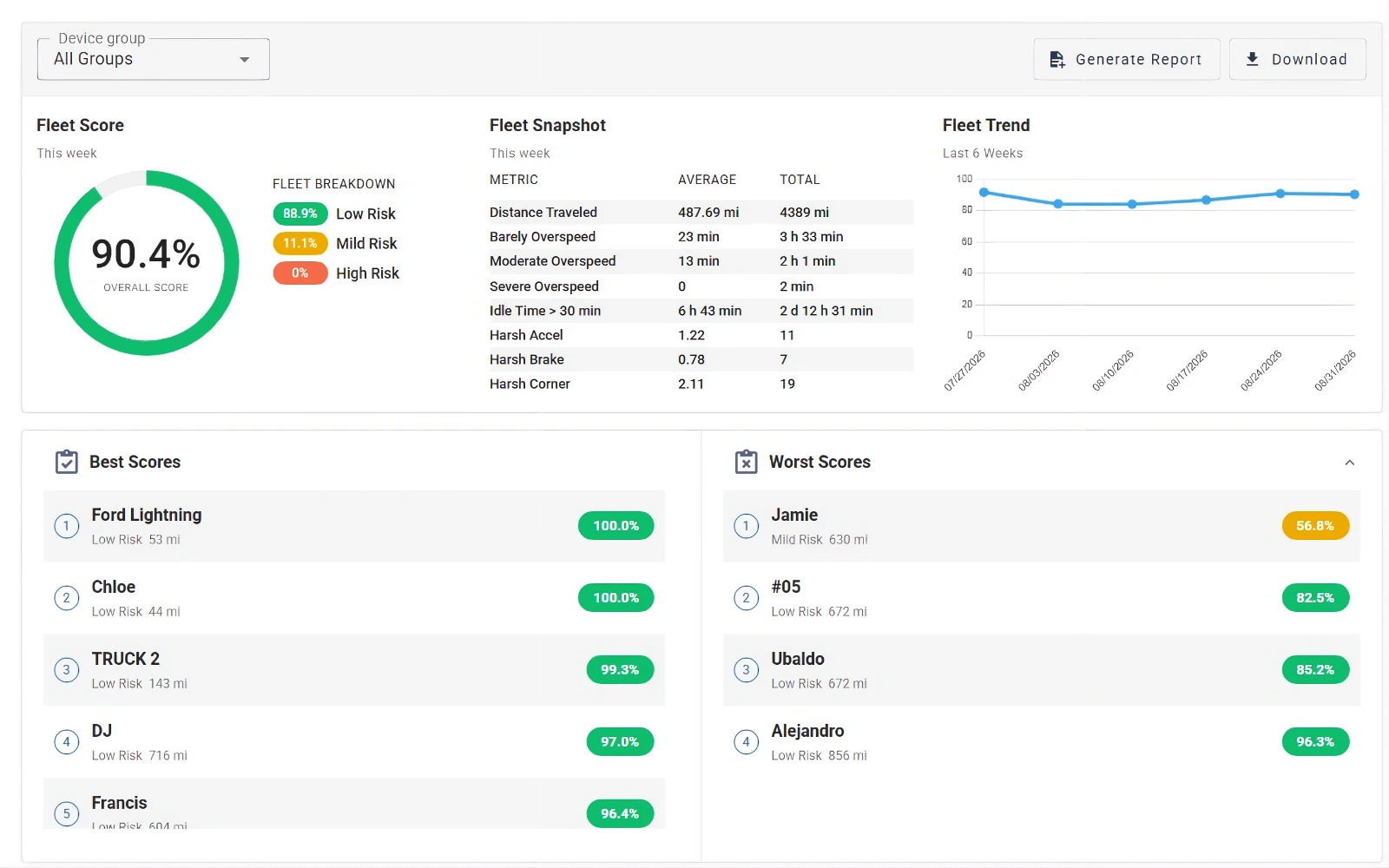
Drivers' scorecards: fleet score, six-week improvement trend, best and worst scores, and a per-device data table grouped by device group.
Custom driver training
- Coach drivers on their individual weaknesses with their own footage to inform session focus
- Build a custom safety training deck with historical dashcam footage
- Increase relevance with real-world examples from your own fleet
- Target recurring safety issues
- Update content as needed as new incidents occur
- Automatically measure improvements for any driver, group, or your entire fleet
Real-time tracking
- Location updates every 2 to 5 seconds
- Accurate to within ~6 feet
- 99.99% system uptime rate
- Built into the dashcam — no separate tracking device needed
- Interactive traffic and weather maps provide more accurate customer ETAs, improve dispatching, safety, and reduce fuel waste.
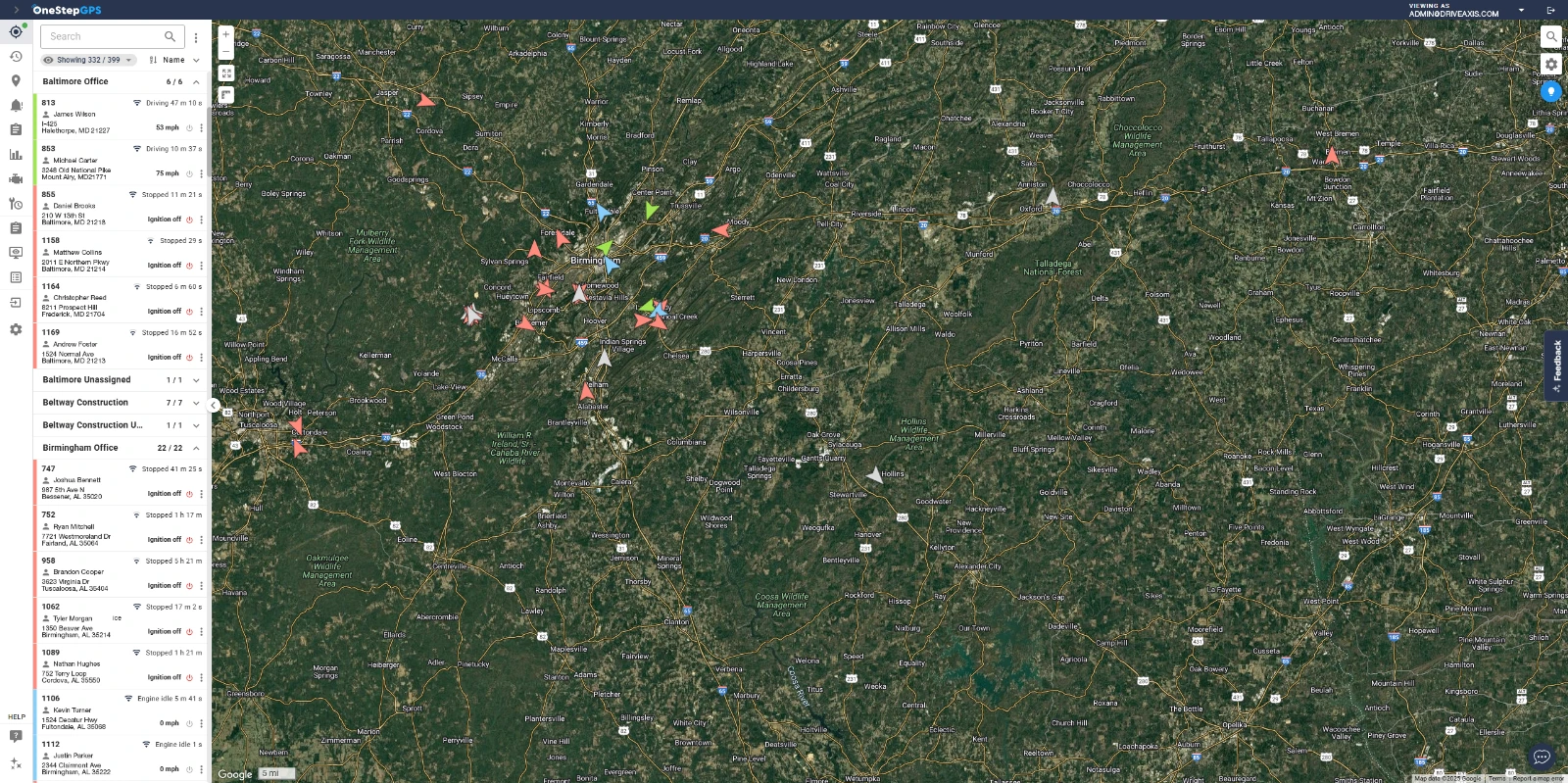
Real-time fleet tracking: see all vehicles and assets on a single screen.
Livestream dual-facing video and audio for further context and a full first-person view.Universal platform SIM cards
Dashcams run on universal platform 4G LTE SIM cards that automatically roam, providing:- Connection to the strongest cellular signal
- More accurate tracking
- Fewer interruptions
- More reliable service
Historical route data & reporting
The system supports full historical data and reports for:- Event-linked location & speed data
- Stops along a route
- Driving start and end times
- Deviation from assigned routes
- Fuel usage
- Safety incidents
- Preventive maintenance and repairs
- And more
Employee accountability
Prevent time fraud, protect against vehicle misuse, and improve safety.
The platform alerts for:
- Camera obstruction
- Device tampering
- After hours use
- Unsafe driving
- Cell phone use
- Fatigued driving
- Eating, drinking, and smoking
- Distracted driving
- Tailgating
- Speeding
- Hard braking
- Rapid acceleration
- Harsh cornering
- Vehicles entering and leaving geofence sites
- Stops along a route
- Trip start and end times
Insurance integration
One Step GPS partners with more than 28 insurance providers that offer preferred pricing and rewards based on policyholder safety and risk data, including:- Aon
- Alliant Insurance Services
- Amwins
- Berkley
- HUB
- Kinsale
- National Indemnity Company
- RLI
Fuel card integration
One Step GPS dashcams integrate with Coast fuel cards.
Receive live notifications when fuel-ups are attempted without your vehicle present.- Immediately approve or deny charges
- Customize card limits
- Assign new cards instantly
- Save 2 to 10¢ per gallon
- Receive 1% cashback on all other purchases
- Track expenses in real time
Automated maintenance
Dashcams integrate with automated maintenance features, including:- Automated scheduling for oil changes, air filter replacements, inspections, registrations, and other preventive maintenance
- Service reminders based on engine hours, miles driven, and diagnostic codes
- Live diagnostic reports for check engine lights and other problems
- Real-time alerts for hard braking, speeding, idling, and more
- Centralized recordkeeping
- VIN detection
- Vehicle speed
- Fuel level
- Odometer readings
- Engine oil temperature
- Engine coolant temperature
- DTCs and check engine codes
- RPMs
- Average fuel economy
- Transmission fuel temperature
- Throttle position
- Ambient air temperature
- DEF levels
- Turn signals*
- Tire pressure*
- Seatbelt use*
- Soot levels*
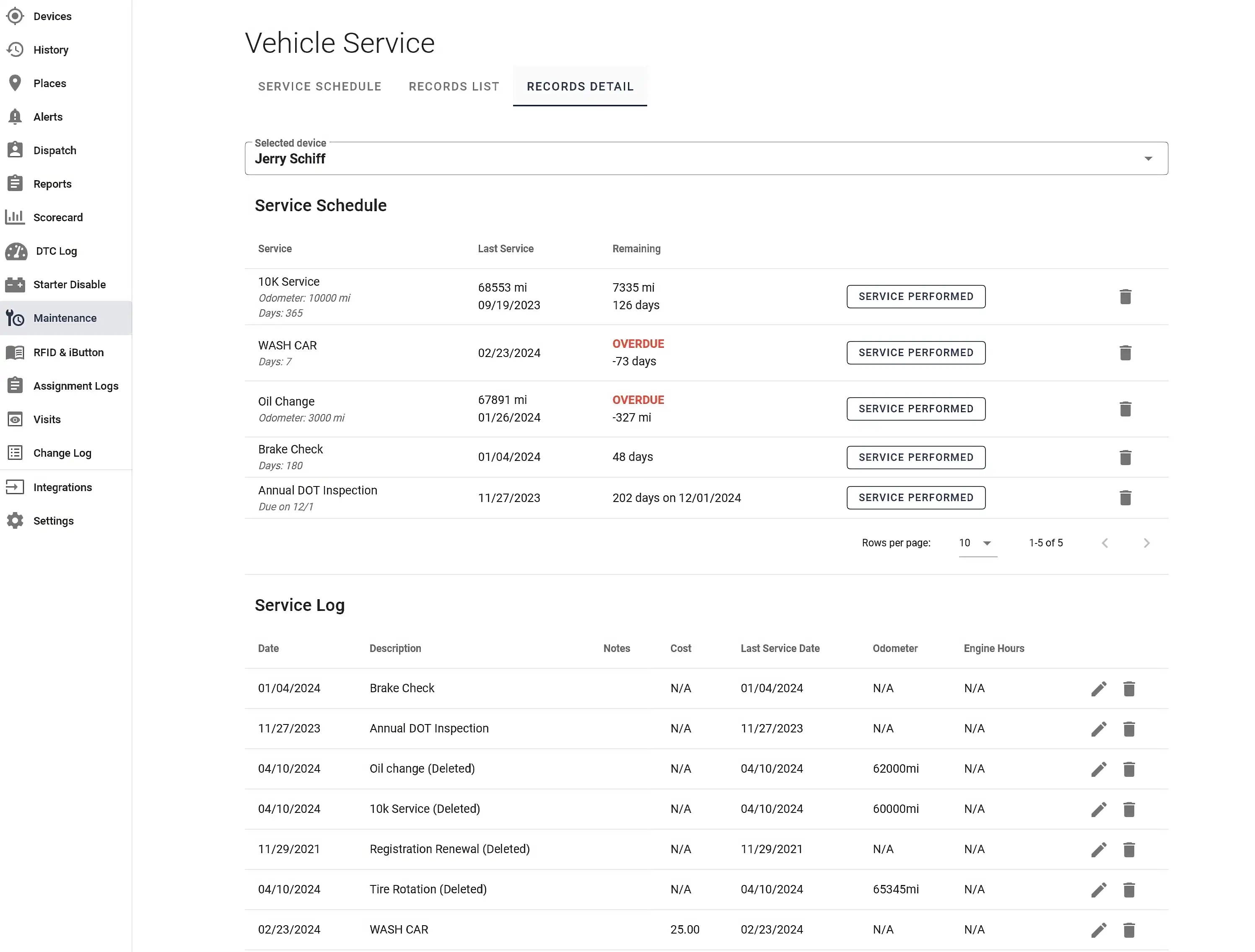
The maintenance suite: service schedules with remaining miles and days, overdue flags, and a centralized service log.
Software integration & open API
The One Step GPS Marketplace offers integrations with top fleet management software at no extra cost, including:
- ServiceTitan
- Jobber
- Fleetio
- Project44
- Whip Around
- Clue
Data security features
The platform offers the following security features:- SOC 2 Type II and ISO 27001 certifications
- SSO
- 2FA/MFA
- TLS 1.2+
- AES-256 encryption
- Redundant cloud service
- Exclusively North American data warehousing
05
Installation
Dashcams self-install in minutes; no professional help is required.
Before leaving our warehouse, every dashcam is fully prepared for installation. Devices arrive activated, labeled, configured for their respective vehicles, and linked to the appropriate account. The only remaining step is physical installation into the vehicle:
- Adhere device to windshield or dashboard
- Connect dashcam to OBD port with 6-foot cable
- Tuck excess cable into roof
- Start tracking
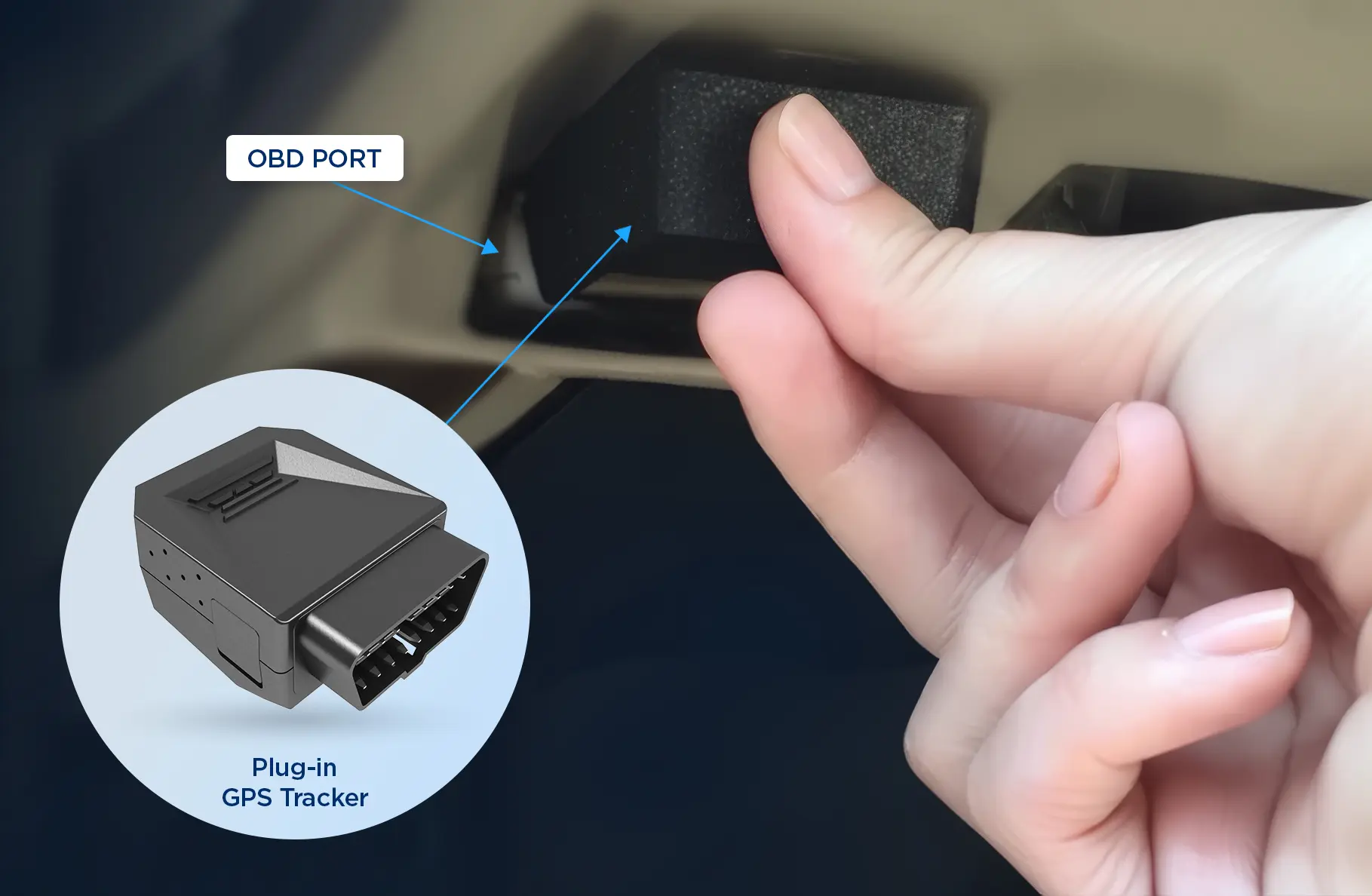
The OBD port location under the dashboard. See https://www.onestepgps.com/installation.
In open areas, location tracking starts after ~5 minutes and remains connected thereafter.
Dashcams include:
- 1 six-foot cable
- 1 universal platform SIM card
- 1 256 GB microSD card
- 1 adhesive attachment
06
Connectivity & Power Requirements
Dashcams receive power from the vehicle and do not need to be charged.
OBD Port Requirements
- Compatible with OBD or J1939 diagnostic port
- OBD-II port connection required for features that need access to the vehicle's computer
- OBD-I vehicles are compatible with most functions, including AI safety detection, video/audio recording, and GPS tracking
- OBD adapters are available to fit nearly any vehicle
| Feature | OBD-II Compatible? | OBD-I Compatible? |
|---|---|---|
| AI detection and alerts | Yes | Yes |
| Road- and cabin-facing video | Yes | Yes |
| Audio recording | Yes | Yes |
| Features that require connection to the vehicle's computer (VIN detection, odometer readings, diagnostics, etc.) | Yes | — |
LTE Connectivity Requirements
Livestreaming and real-time tracking require an active LTE connection.
Universal platform SIM cards improve connectivity and reduce service interruptions by automatically connecting with the strongest signal.
Dashcams continue recording and tracking during temporary service interruptions; recorded data is uploaded once service is restored.
07
Cost
$29.95
/month/deviceRent Your Dashcam
$25.95
/month/device + $350 purchase price/device
Purchase Your DashcamRent Your Dashcam: $29.95/month/device + one-time startup fee which covers activation and first and last month's service; last month's refunded when device is returned.
Purchase Your Dashcam: $25.95/month/device + $350 purchase price/device
- No contracts
- Lifetime hardware warranty
- No hardware costs for rentals. Loaned devices must be returned at cancellation
- Unlimited access to US-based support
08
Limitations
- Features requiring access to the vehicle's computer are not compatible with OBD-I ports, including odometer readings, VIN detection, and diagnostic readouts.
- Most core capabilities, including camera features, AI alerts, and GPS tracking, are fully functional.
- Livestreaming requires an active LTE connection. Dashcams may temporarily go offline in low-service areas like parking garages.
- The device continues to record as long as it remains on. Once service is restored, stored data is automatically uploaded to fill in any gaps.
- The One Step GPS dashcam does not currently support auxiliary side-, or back-mounted cameras for additional viewing angles.
- This option is under active development.
- Older recordings stored locally are overwritten as the SD card fills up.
- Important footage can be preserved via app download, cloud upload, or transfer to external storage.
- By default, dashcams record only when the vehicle is on.
- Parking mode can be used to record for a specified period after ignition is off.
- A dirty windshield can result in blurry footage.
- Keep windshields clean for the highest video quality.
- In-cabin and audio recordings are prohibited in some states.
- These features can be disabled for compliance. Fleets should seek legal counsel regarding applicable laws and regulations.
09
Legal Considerations
Nothing in this resource constitutes legal advice, discuss your specific needs and case with a lawyer.
Common Restriction #1: Windshield Obstruction
Many states prohibit dashcams from obstructing the windshield. Our dashcams can be adhered to the glass or dash, allowing you to place them in a non-obstructive location.Common Restriction #2: Audio Recording
Some states require one-party consent for audio recording (as long as one conversation participant agrees). Others require the implied or express consent of everyone in the vehicle.
Audio recording can easily be turned on or off to comply with local regulations and company policy.
Common Restriction #3: Recording on Private Property
Recording on public property is legal in most states, but recording on private property is often prohibited. Parking lots and delivery sites may count as private property.
Road-facing video can be toggled off to prevent privacy violations when applicable.
Common Restriction #4: GPS Tracking
Some states require explicit driver consent for GPS monitoring. Others allow tracking without consent if the vehicle is owned or leased by the person or entity doing the tracking.
Some states prohibit GPS tracking that occurs on personal time or causes reasonable fear.
Laws on dashcam recording and GPS monitoring vary widely; this is not an exhaustive list. Fleets should check state regulations and consult with their legal teams before implementing a tracking program.
10
Comparisons & Alternatives
One Step GPS vs. Competing Dashcams
| One Step GPS | Samsara | Motive | Lytx | |
|---|---|---|---|---|
| Contracts | No contract | 3-year contracts are common | Typically 1- to 3-year contracts | Reported multi-year contracts |
| Dashcam pricing | Loaned device
$29.95 per month per device; one-time startup fee + tax (covers activation and first and last month's service, which is refunded when device is returned) Purchase device
Dashcam price: $350 + tax; $25.95 per month per device | Custom quote required | Custom quote required | Custom quote required |
| Installation | Self-install in minutes | Self-installation common for plug-ins, but professional mounting and wiring often required for dashcams | Self-installation is common | Self-installation possible but requires minimum qualifications |
| Real-time tracking | Included | Included | Included | Included |
| Video resolution | Up to 4K at 30 fps | Up to 1440p | Up to 1440p | Up to 1080p |
| Onscreen driver alerts | Included | Uncertain | Included | Included |
| User limitations | No extra charge for multiple user accounts | No public information available | No extra charge for multiple user accounts | No public information available |
| Digital footage access | Unlimited streaming and downloads at no extra charge | No public pricing information available | Available at no apparent upcharge | Available; no public information on pricing |
| Customer service | 4.9-star rating
In-house, US-based support | 4.3-star rating
Customers report fragmented service | 4.3-star rating
Long resolution times reported | 3.6-star rating
Reportedly undertrained representatives and long wait times |
11
Frequently Asked Questions
- Are AI alerts customizable?Yes. Turn alerts on or off, set custom parameters, and change detection confidence thresholds to fit your operations.
- Do dashcams require professional installation?No, our dashcams self-install in 5 to 10 minutes.
- Why choose a GPS dashcam over a standalone dashcam?By combining real-time tracking with video/audio recording, GPS dashcams eliminate the need for multiple devices. This saves money, vehicle headspace, and battery life.
- How can I get my drivers onboard with being monitored?Initially, some employees may feel unsure about dashcam monitoring. Transparency and honesty are valuable when implementing any fleet tracking program. Involve your drivers from the beginning and set clear expectations. Make sure they understand how dashcams benefit them, not just the company (they provide objective evidence to resolve disputes and defend against false claims, and they help the driver self-correct before a manager gets involved). We also recommend gamifying safety to generate driver buy-in. Offer rewards for good driving, meeting safety goals, and performance improvements.
- How much does dashcam monitoring cost?Our dashcams are $29.95 per month per device, plus a one-time startup fee and tax — this covers activation and first and last month's service (the last month is refunded when the device is returned). Dashcams can also be purchased for $350 + tax, with a service fee of $25.95 per month per device. Contracts are never required.
- How is dashcam footage stored?Recordings are stored locally on the included SD card and can be transferred to external storage at any time. Unlimited data can be uploaded to the cloud for 13 months of storage.
- How do dashcams help resolve customer disputes?Verify completed service with dashcam footage, vehicle location history, and stop reports. By using geofences, managers can assign customer names to their physical addresses and create reports to see when drivers visited.
- Do dashcams reduce the need for check-ins with drivers?Yes. Our dashboard puts every vehicle's location on one screen, meaning fewer calls for updates on ETA, progress, and location.
- How do AI-powered alerts and automated coaching improve safety?Our AI interface automatically detects, alerts for, and redirects unsafe behavior. When risky driving is detected, managers are instantly notified. The driver also receives live voice and onscreen alerts. All safety alerts are recorded with our drivers' scorecards for actionable coaching data.
- Why do fleets switch to One Step GPS dashcams?Fleets switch to One Step GPS for enterprise-grade features with contract-free terms, transparent pricing, and highly rated customer service.
- Can I disable in-cab or audio recording?Yes, these features can be turned on or off to comply with company policy and legal requirements.
- What happens if dashcams lose cell service?If dashcams temporarily go offline (like in a low-service area or parking garage), they will continue recording as long as the device remains on. Recorded data is automatically uploaded once cellular service returns.
- Can I livestream video and audio?Yes, managers can livestream at any time from the dashboard.
- Will the dashcam drain a vehicle's battery if the vehicle is parked for a long time?No. Our cameras monitor vehicle battery life and automatically shut off if battery voltage goes below 11.9 VDC for more than 5 minutes.
- Do dashcams work with older vehicles?Most features are compatible with any vehicle with an OBD port, including video/audio recording, AI safety detection, and GPS tracking. Vehicles with OBD-I ports are not compatible with features requiring access to the vehicle's computer (odometer readings, VIN detection, and diagnostic readouts).
12
Technical Specifications
| Processor | Qualcomm QCS610 Octa-core CPU |
| Memory | 4 GB LPDDR4x |
| Storage | 64GB eMMC storage, 256GB microSD card |
| Cameras | Up to 4K at 30 fps Road-facing camera, up to 1080p at 30 fps Cabin-facing camera |
| Video | Live/historic streaming @ 720p |
| Field of View | Road-Facing camera 140 degrees, Cabin-facing camera 130 degrees |
| Night Vision | High-quality infrared on cabin-facing camera |
| Display | 3.5" IPS LCD, 340x800RGB, Security LED (road-facing) |
| Audio | High-fidelity speaker, Dual noise-canceling microphones |
| Connectivity | LTE, WiFi 5, Bluetooth 5, BLE gateway, USB-C, CANBus (J1979 - OBD-II, J1979-2 - OBD on UDS, J1939, and CAN FD) |
| Sensors | L1/L5 GNSS (GPS, GLONASS, Galileo, BDS, QZSS), Accelerometer, Gyroscope, Magnetometer, Proximity, Temperature |
| Power | Powered via OBD-II, Intelligent power management, Internal backup battery |
| Size | H 2.0 in x D 1.3 in x W 8.0 in |
| Weight | 0.37 lb (169 g) |
| Security | Encrypted cloud storage, Secure web transfer (TLS 1.2), Tamper-proof enclosure |